Webhooks
Receive real-time notifications when async screenshot jobs and batches complete, or when a Rendex Watch detects a change, recovers, or errors. All webhooks are HMAC-signed for security and retried automatically on failure.
How Webhooks Work
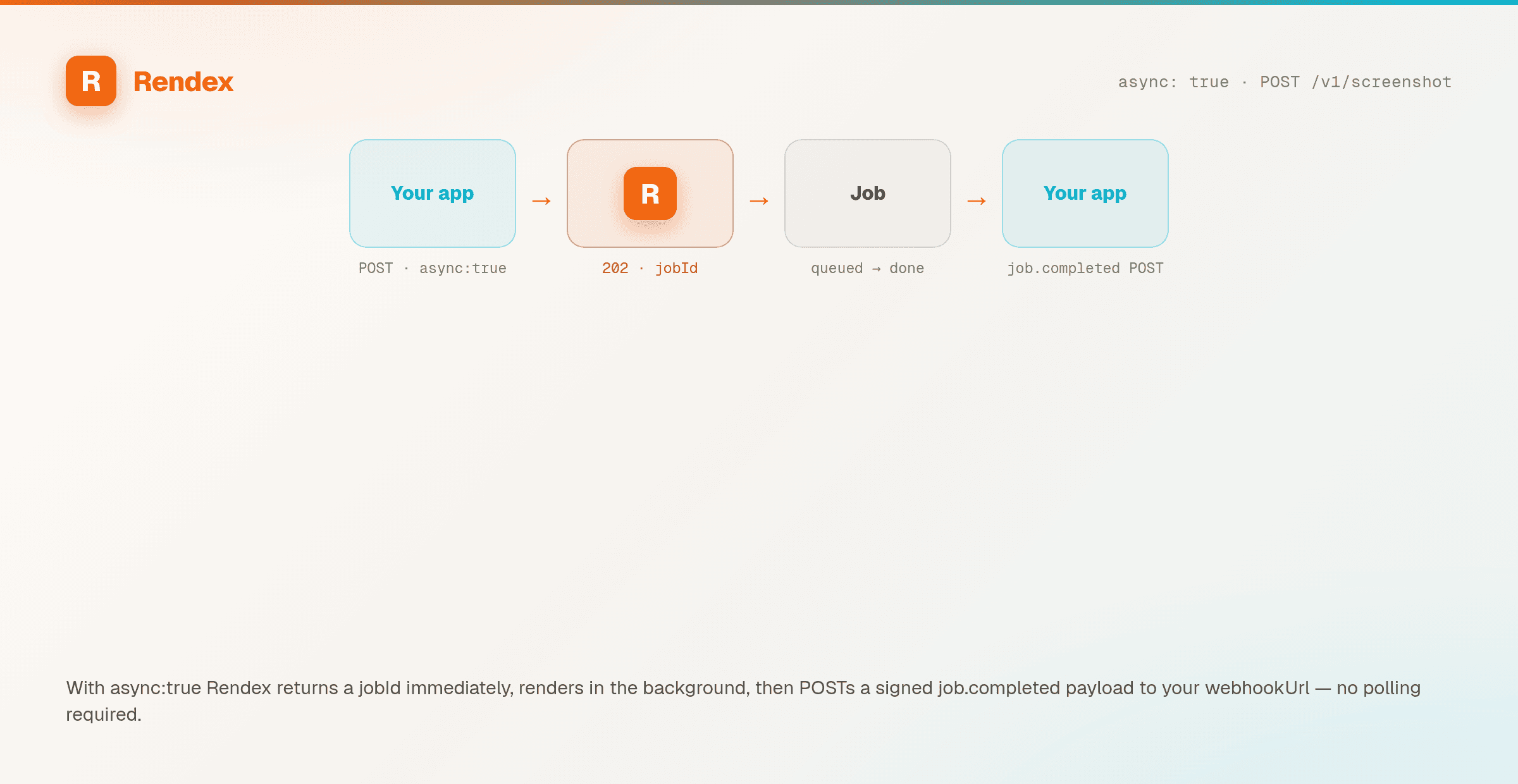
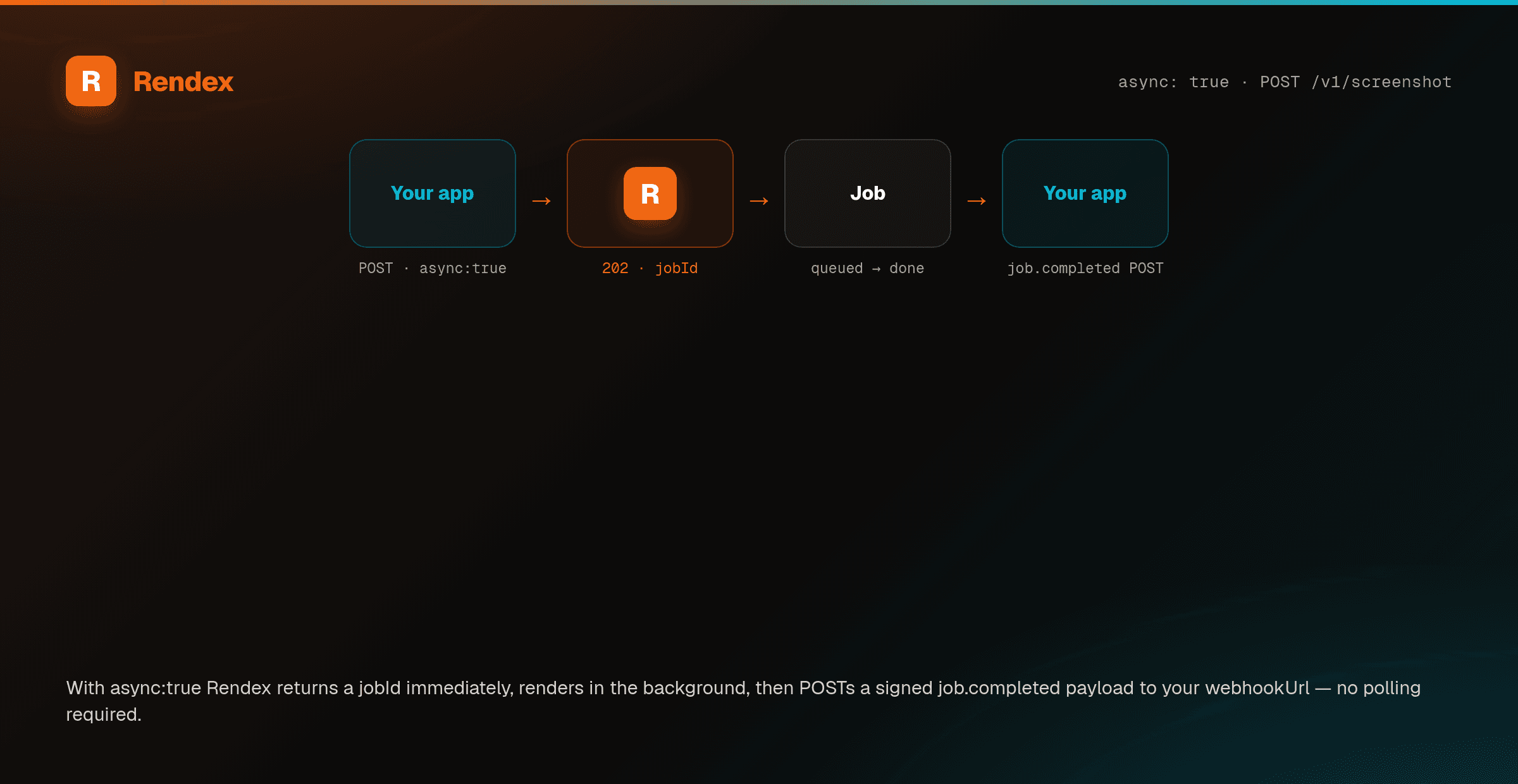
- Include a
webhookUrlwhen creating an async job or batch - When the job completes (or fails), Rendex sends a POST request to your URL
- The payload is signed with HMAC-SHA256 so you can verify it came from Rendex
- If delivery fails, Rendex retries up to 3 times with exponential backoff
Setting a Webhook URL
Pass webhookUrl with any async request:
{
  "url": "https://example.com",
  "async": true,
  "webhookUrl": "https://your-server.com/webhook/rendex"
}
For batches, the webhook fires once when the entire batch completes:
{
  "urls": ["https://example.com", "https://github.com"],
  "webhookUrl": "https://your-server.com/webhook/rendex"
}
Event Types
| Event | Trigger | Payload Key Fields |
|---|---|---|
job.completed | An async screenshot job finished successfully | jobId, status, resultUrl, metadata |
job.failed | An async screenshot job failed | jobId, status, error |
batch.completed | All jobs in a batch are done (completed or failed) | batchId, totalJobs, completedJobs, failedJobs, jobs[] |
watch.changed | A monitored page changed beyond its threshold (Watch) | watchId, runId, url, summary (one-line “what changed”), diffScore, diffPixels, textDiff, beforeUrl, afterUrl, diffOverlayUrl, cropUrl (crop of just the change), and changedRegion |
watch.recovered | A failing watch succeeded again (recovery edge) | watchId, runId, url, afterUrl |
watch.error | A watch check entered the failed state (failure edge) | watchId, runId, url, error |
Watch events fire on the same HMAC-signed channel as job and batch webhooks (same headers and signature scheme). The watch.changed payload carries a one-line summary of what changed, the added/removed textDiff lines, a 0..1 diffScore, and before/after/overlay/crop image URLs — the same field names the REST run history returns, so a text-only workflow needs no image or dashboard. See the Watch API docs for the full payload.
Payload Examples
job.completed
{
  "event": "job.completed",
  "jobId": "550e8400-e29b-41d4-a716-446655440000",
  "status": "completed",
  "resultUrl": "https://api.rendex.dev/v1/images/abc123?sig=...",
  "metadata": {
    "url": "https://example.com",
    "width": 1280,
    "height": 800,
    "format": "png",
    "bytesSize": 524288,
    "loadTimeMs": 2150
  },
  "completedAt": "2026-04-07T12:00:30Z"
}
job.failed
{
  "event": "job.failed",
  "jobId": "550e8400-e29b-41d4-a716-446655440000",
  "status": "failed",
  "error": "The page took too long to load. Try increasing the timeout or using bestAttempt=true.",
  "completedAt": "2026-04-07T12:00:45Z"
}
batch.completed
{
  "event": "batch.completed",
  "batchId": "660e8400-e29b-41d4-a716-446655440000",
  "status": "completed",
  "totalJobs": 3,
  "completedJobs": 2,
  "failedJobs": 1,
  "completedAt": "2026-04-07T12:01:00Z",
  "jobs": [
    { "jobId": "aaa-111", "status": "completed", "resultUrl": "https://..." },
    { "jobId": "bbb-222", "status": "completed", "resultUrl": "https://..." },
    { "jobId": "ccc-333", "status": "failed", "error": "Screenshot capture failed." }
  ]
}
Webhook Headers
| Header | Description |
|---|---|
x-rendex-signature | HMAC-SHA256 hex signature of the payload |
x-rendex-timestamp | Unix timestamp (seconds) when the signature was created |
x-rendex-event | Event type: job.completed, job.failed, batch.completed, watch.changed, watch.recovered, or watch.error |
x-rendex-delivery-id | Unique delivery ID — same across retries for idempotency |
Content-Type | application/json |
User-Agent | Rendex-Webhook/1.0 |
Verifying Signatures
The signature is computed as HMAC-SHA256(timestamp + "." + body, secret). This follows the same pattern as Stripe webhooks.
import crypto from "node:crypto";

function verifyWebhook(body, signature, timestamp, secret) {
  const message = `${timestamp}.${body}`;
  const expected = crypto
    .createHmac("sha256", secret)
    .update(message)
    .digest("hex");

  // Timing-safe comparison to prevent timing attacks
  if (signature.length !== expected.length) return false;
  return crypto.timingSafeEqual(
    Buffer.from(signature),
    Buffer.from(expected)
  );
}

// Express / Hono handler
app.post("/webhook/rendex", (req, res) => {
  const body = JSON.stringify(req.body);
  const sig = req.headers["x-rendex-signature"];
  const ts = req.headers["x-rendex-timestamp"];

  if (!verifyWebhook(body, sig, ts, process.env.WEBHOOK_SECRET)) {
    return res.status(401).json({ error: "Invalid signature" });
  }

  const { event, jobId, status, resultUrl } = req.body;
  console.log(`[${event}] Job ${jobId}: ${status}`);

  res.status(200).json({ received: true });
});
Retry Behavior
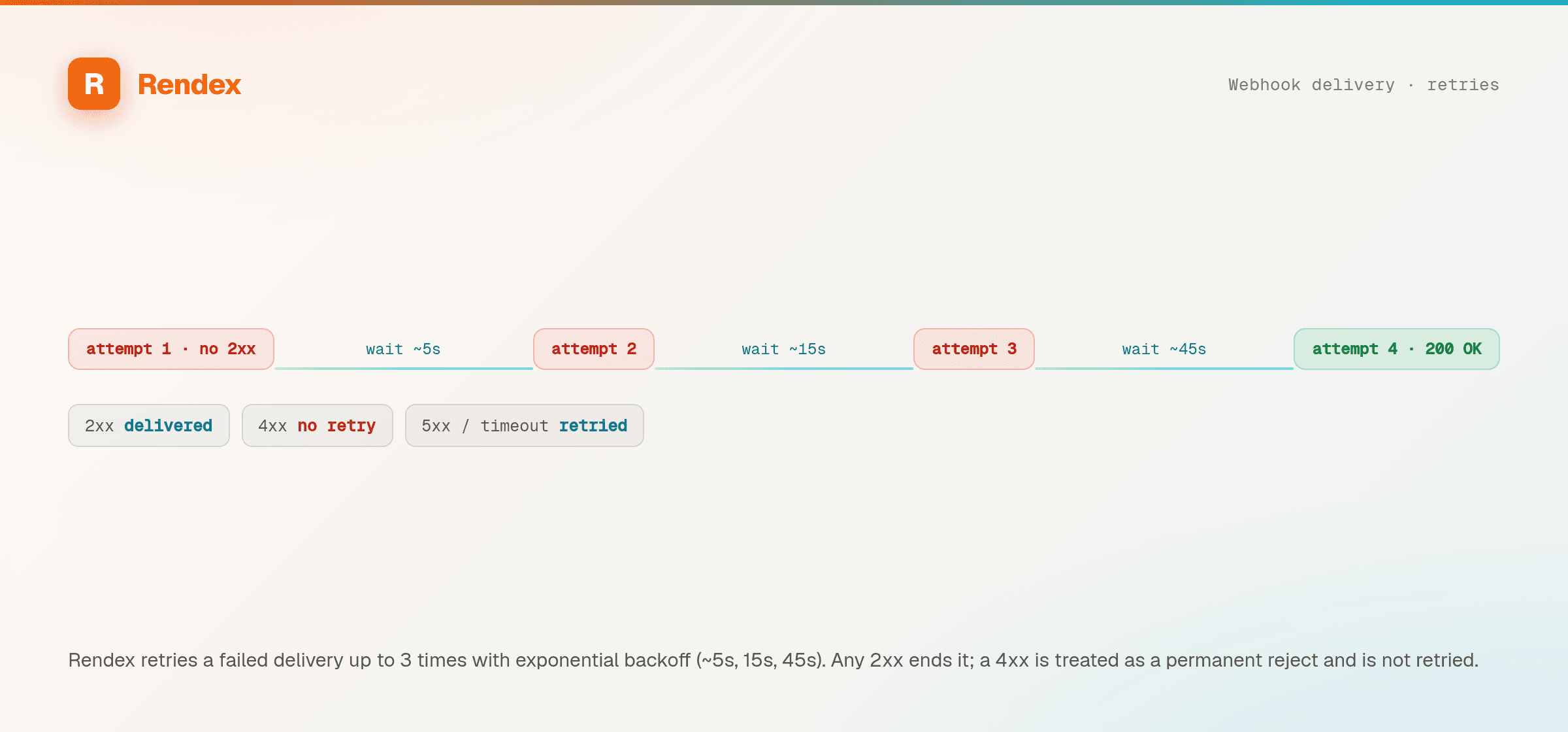
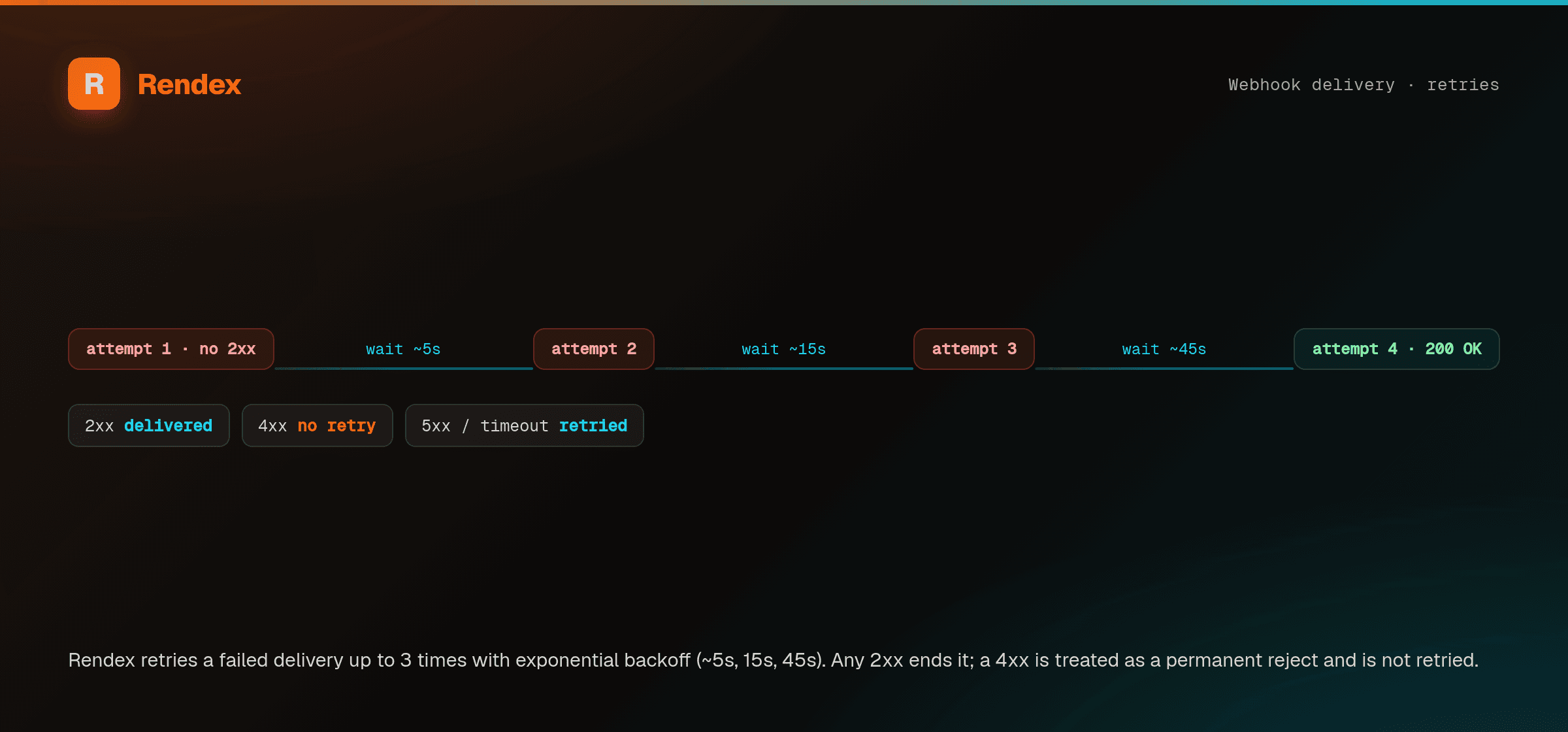
- Max retries: 3 (4 total attempts)
- Backoff: Exponential with jitter — approximately 5s, 15s, 45s
- 2xx response: Delivery confirmed, no retry
- 4xx response: Client error — no retry (fix your endpoint)
- 5xx response: Server error — retried
- Timeout: 10 seconds per attempt — retried
Best Practices
- Always verify signatures — reject unsigned or invalid requests
- Use the delivery ID for idempotency — the same
x-rendex-delivery-idis sent across retries - Return 200 quickly — process the payload asynchronously to avoid timeouts
- Use HTTPS — webhook URLs must be publicly accessible HTTPS endpoints