Watch API
Rendex Watch monitors a URL for changes. You create a watch, and Rendex renders the page in real Chrome on your schedule and tells you when it changes. By default it catches any real change — big or small, visual or text: every check runs a before/after visual diff (returning a highlighted overlay) and a full-page text diff, and alerts you over an HMAC-signed webhook or email if either one moves. You don't have to pre-guess what counts — a swapped hero image and a single changed price are both caught. It uses the same rdx_ key and credit pool as the rest of Rendex — see the product overview or how it compares to other monitors.
Prefer no code? You can create and manage watches point-and-click in your dashboard — no API required. This page covers the REST API for developers and AI agents.
Endpoints
All endpoints live under /v1/watches and require your API key.
| Method | Path | Description |
|---|---|---|
| POST | /v1/watches | Create a watch (charges 1 credit for the baseline capture) |
| POST | /v1/watches/test | Dry-run a config before creating it — renders + returns reachability + a screenshot (1 credit, refunded if unreadable) |
| GET | /v1/watches | List your watches (filter with ?status=active|paused|all — default all) |
| GET | /v1/watches/:id | Fetch one watch |
| GET | /v1/watches/:id/runs | Run history with signed before/after/overlay URLs |
| POST | /v1/watches/:id/run | Run a check now (charges 1 credit) |
| PATCH | /v1/watches/:id | Update, pause, resume, or change the URL |
| DELETE | /v1/watches/:id | Delete a watch and its run history |
Create a watch
curl -X POST https://api.rendex.dev/v1/watches \
  -H "Authorization: Bearer rdx_your_key" \
  -H "Content-Type: application/json" \
  -d '{
    "url": "https://stripe.com/pricing",
    "intervalMinutes": 180,
    "webhookUrl": "https://your.app/hooks/rendex",
    "notifyEmail": "you@youraccount.com"
  }'
# That's it — diffMode defaults to "both", so this catches any visual OR text change.
url is the only required field. intervalMinutes is the check frequency — an integer from 5 to 43200 (30 days, the longest gap between checks), default 1440 (daily), subject to your plan's floor. webhookUrl and notifyEmail are both optional alert channels — see How you get alerted below. Everything about what counts as a change has a sensible default (next section), so a bare { "url": "…" } is a complete, working watch.
What counts as a change
By default a watch detects any real change, and you don't configure anything to get that. Each check compares the page to its baseline two independent ways and alerts if either moves:
- Visual — a real-Chrome before/after pixel diff of the whole page, returning a highlighted overlay of what moved. Detection is region-based: it looks for a changed region (a swapped image, a new banner, a moved price), so a small change on a very long page still trips — it is nota “what percent of the page changed” threshold that a price line on a 20,000px page would never reach.
- Text — a diff of the page's full visible text(everything a human reads: pricing tables, nav, footer — not just the article body), reporting the exact added/removed lines. This is what reliably catches a
$7.99 → $19.99price change regardless of where it sits on the page.
Two knobs tune this, but most watches leave them at their defaults:
| Field | What it does |
|---|---|
diffMode | both (default) runs the visual and text diffs together and alerts on either. visual or text narrow it to a single signal — e.g. visual for a page whose wording changes constantly but whose layout matters, or textto monitor a PDF (which can't be pixel-diffed) or ignore purely visual churn. |
threshold | A visual sensitivity selector (0–1, default 0.01). Low (the default) alerts on any change, including a small one on a long page. A value of 0.06 or higher switches to a blunt whole-page ratio gate — only a major visual change (a big fraction of the page) alerts. Handy for a page that redesigns often and you only want to hear about large shifts. It does not affect text detection. |
Two combinations are rejected at create time: a text (or both) diff can't use geo-targeting (a geo render returns no extracted text), and PDF output can't be visually diffed (pair format: pdf with diffMode: text).
Three more optional create fields:
| Field | What it does |
|---|---|
name | Optional label (up to 120 chars) shown in the dashboard and run history. |
paused | Create the watch paused (default false). A paused watch captures no baseline and draws no credit until you resume it with PATCH /v1/watches/:id (paused: false). Note: paused watches still count toward your plan's watch limit. |
aiSummary | Opt this watch into an AI-written“what changed” summary (Pro+). Every plan already gets a plain-English summary on each change (a templated line); on Pro and Enterprise, setting this to trueupgrades a text change's summary to a one-sentence AI-written description in the summary payload field, the email, and the dashboard. |
Beyond the scoping knobs below, renderParams accepts the full standard capture param set — format (png/jpeg/webp/pdf), width/height, fullPage (defaults to true for watches, so the whole page is monitored), device, deviceScaleFactor, darkMode, blockAds, blockCookieBanners, hideSelectors, waitUntil, delay, timeout, and geo / geoCity / geoState (Pro+) — applied on every check. Inline-source params (url/html/markdown) and credential knobs (cookies/headers/css/js) are not accepted; the watch's target is the top-level url.
Scope what you watch
By default a watch diffs the whole rendered page. A few renderParams knobs narrow the visual diff and quiet the text diff so you only hear about changes you care about:
{
  "url": "https://competitor.com/pricing",
  "diffMode": "visual",
  "renderParams": {
    "selector": ".pricing .pro-plan .price",
    "ignoreRegions": [{ "x": 0, "y": 0, "width": 1200, "height": 90 }]
  }
}| Param | What it does |
|---|---|
selector | Capture and diff ONLY this CSS selector — watch just one price, banner, or section instead of the whole page. Visual-first (in text mode the extracted text is still the full page). |
ignoreRegions | Rectangles ({x, y, width, height} in pixels on the captured image) masked in both captures before the diff — silence dynamic zones like an ad slot or a clock so they never trip a change. Applies to the visual diff (visual and both modes). |
ignoreText | Substrings or /regex/ patterns stripped from both texts before the text diff — silence boilerplate like timestamps, view counts, or session tokens. Up to 50; applies to text and both modes. |
minTextChars | Minimum number of added + removed characters for a text change to count — ignore tiny edits below the size you care about. |
suppressWhilePresent | While the page text contains any of these markers (e.g. “Out of stock”, “Loading”), the run is treated as unchanged — no alert, no baseline drift — until the marker clears. Up to 20. |
If a site blocks monitoring
Rendex Watch fetches pages with a self-identifying User-Agent (the RendexWatch token — see the crawler page) so site owners can recognize it. If a site blocks that identity, set renderParams.uaMode to control how the monitor presents itself:
| uaMode | Behavior |
|---|---|
auto | Default. Identify as RendexWatch, and if the page looks blocked, retry once with a standard browser identity. |
identify | Always identify as RendexWatch; never fall back. Most polite — best when you control the target site. |
stealth | Always present a standard browser identity. Use only when a site blocks the identified monitor. |
Rendex won't diff an error page against your baseline: if a check renders an HTTP 4xx/5xx, the run is recorded as a failure (and its credit refunded) instead of firing a false “changed” alert.
When a check fails
When a scheduled check can't complete, Rendex sends one “We couldn't check your page” email (a watch.error event) with a plain-language reason and a How to fix line. A few things soften the edges before you ever hear about it:
- Transient blips are retried.A slow load, a network hiccup, or a one-off server 5xx is retried once within the same check before it counts as a failure — a single bad moment (say, during the site's own deploy) won't email you.
- Alerts are edge-triggered. You get one error email when a watch starts failing, not one per check — and one
watch.recoveredwhen it's healthy again. A day-long outage is a single pair of emails. - Failed checks are free. The credit is refunded, so a failing watch never drains your pool.
Each reason and its best workaround:
| What the email says | What it means | Best fix |
|---|---|---|
| The site blocked automated access | The page served a 403/429 or a bot challenge (e.g. Cloudflare) instead of content. | Set uaMode to stealth (above). If it still fails, the site likely requires login or a CAPTCHA — monitor its API/RSS instead, or watch a different page. This is the only case where stealth mode helps. |
| The page was too large to capture and compare | A very tall or high-resolution full-page capture exceeded the size a browser render can diff. Rendex auto-downscales large pages to fit, so you'll only see this on extreme cases (a very wide custom viewport, or an enormous page). | Lower renderParams.width, set fullPage: false to watch just the viewport, or add a selector to watch one section. Any of these keeps the capture small. |
| The page took too long to load | The page didn't finish loading within the timeout (already retried once). | Raise renderParams.timeout (up to 60s), set bestAttempt: true to capture a partial render, or use a lighter waitUntil (e.g. domcontentloaded). |
| The element wasn't found | A selector this watch captures or waits for never appeared on the page. | Confirm the selector still exists, loosen it, or remove it to watch the full page instead. |
| The site returned a server error | The page responded with an HTTP 5xx — a problem on the site's side (already retried once). | Usually temporary — the next check often recovers. If it persists, confirm the page loads in a normal browser. |
| We couldn't reach the page | DNS or a connection error — the URL didn't resolve or refused the connection. | Confirm the URL is public and loads in a browser. Private, localhost, and non-resolving addresses can't be reached. |
How you get alerted
A watch reaches you over two independent channels. Turn on either or both by setting a field when you create the watch (or later with PATCH /v1/watches/:id) — both fields are optional and accept null on update to switch a channel back off:
| Channel | Turn it on | Plan | What arrives |
|---|---|---|---|
Set notifyEmail — or leave it unset and alerts go to your account email. For anti-abuse, notifyEmail must be your own account email; any other address is rejected with 400 VALIDATION_ERROR. | Every plan (including Free) | A formatted email from Rendex Watch <notifications@mail.rendex.dev> led by a crop of just what changed, a one-line plain-English summary of the change, before/after links, and a button to the run. | |
| Webhook | Set webhookUrl to an HTTPS endpoint. | Starter and up | An HMAC-signed POST you verify and route into any pipeline (payload below). No code? Point it at a Zapier, Make, or n8n catch hook. |
Both channels fire on the same three events — watch.changed, watch.recovered, and watch.error — and are edge-triggered: one alert when the page changes, one when a failing watch recovers, and one when it first starts failing, never one per check. With neither field set, a watch still records its run history; it just doesn't push a notification.
Change webhooks
On a change, Rendex POSTs a signed payload to your webhookUrl. Verify the x-rendex-signature header against your signing secret exactly as you do for async render jobs (see Webhooks).
{
  "event": "watch.changed",
  "status": "changed",
  "watchId": "b1de4f2a-9abc-4def-8901-2a3b4c5d6e7f",
  "runId": "c2ef5a3b-0d1e-4a2b-9c3d-4e5f6a7b8c9d",
  "url": "https://stripe.com/pricing",
  "changed": true,
  "diffScore": 0.0412,
  "diffPixels": 18240,
  "summary": "A new enterprise tier was added to the pricing table.",
  "textDiff": { "added": ["New enterprise tier"], "removed": [] },
  "beforeUrl": "https://api.rendex.dev/v1/images/…",
  "afterUrl":  "https://api.rendex.dev/v1/images/…",
  "diffOverlayUrl": "https://api.rendex.dev/v1/images/…",
  "cropUrl": "https://api.rendex.dev/v1/images/…",
  "changedRegion": { "x": 0.08, "y": 0.42, "width": 0.5, "height": 0.12 },
  "completedAt": "2026-06-15T12:00:00Z"
}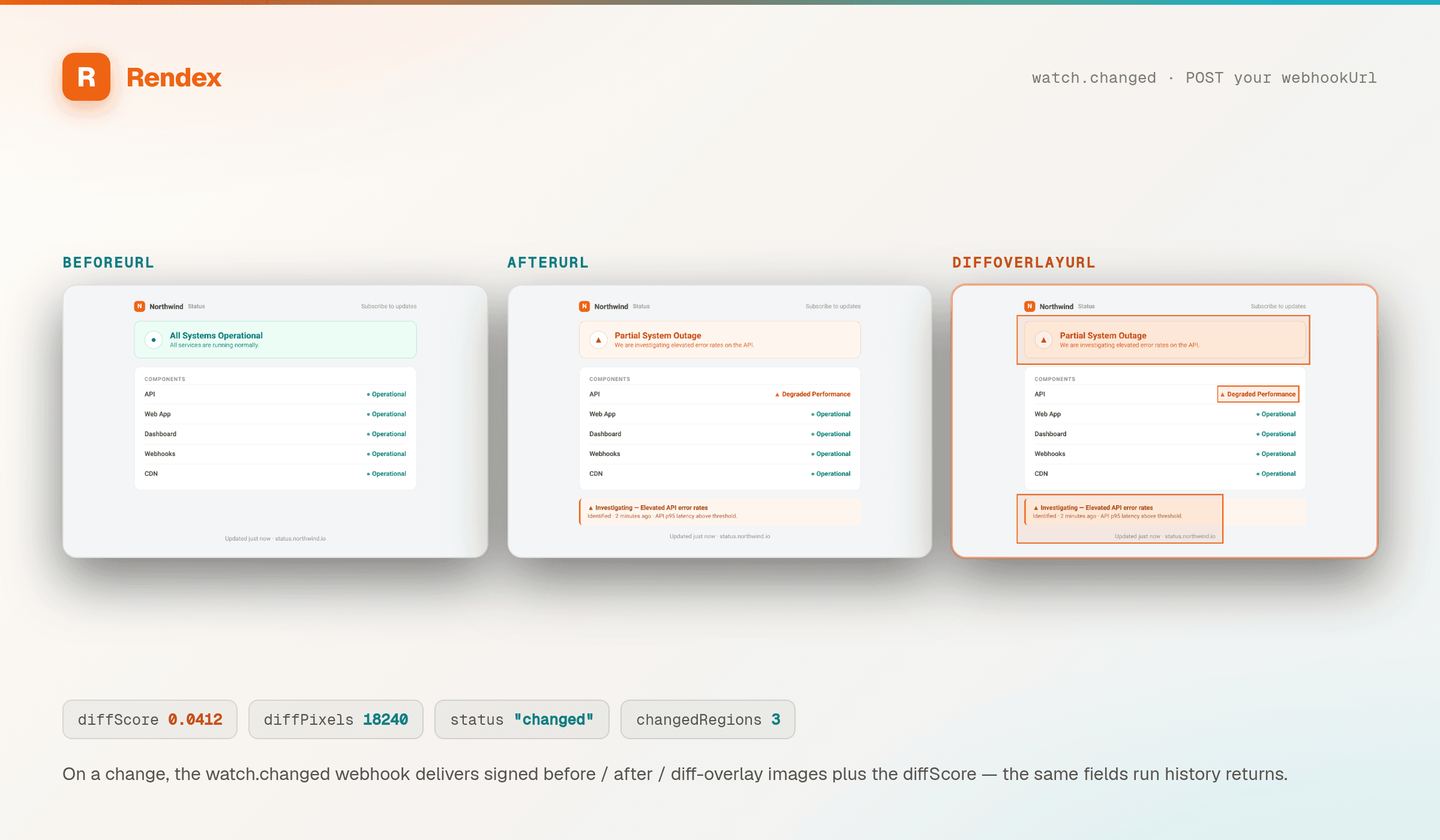
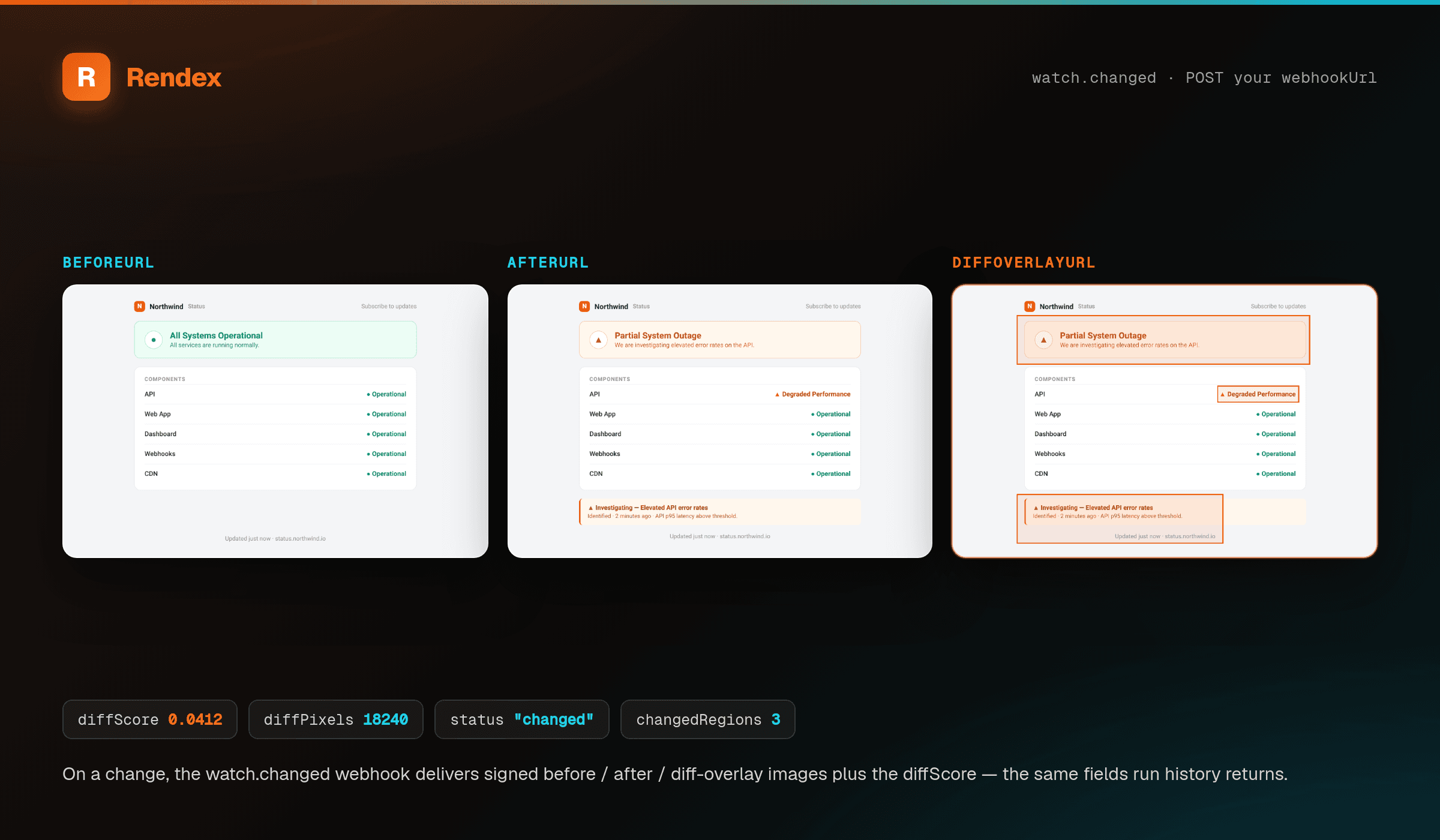
The image URLs are short-lived signed links: the baseline (beforeUrl), the new capture (afterUrl), the highlighted full-page overlay (diffOverlayUrl), and cropUrl — a tight crop of just the changed region, ready to drop straight into Slack or a ticket. changedRegion gives that region as normalized (0–1) page coordinates. diffScore is the fraction of the page that changed (0–1), reported for reference — a changed alert fires on a meaningful region or a text change (see What counts as a change), so a genuine small change can carry a tiny diffScore and still be a real alert.
For a text change, textDiff carries the exact added/removed lines — a text-only workflow (webhook, n8n, Zapier) can post them with no image and no dashboard. And summary is a one-line plain-English “what changed” sentence on every change, every plan: for a text change it summarizes the added and removed lines; for a visual-only change with no text delta, it describes where and how much changed. Pro and Enterprise can opt a watch into an AI-written sentence (see aiSummary); Free and Starter get a clear templated line. So every change carries words, not just a percentage, whichever channel you use. Events are edge-triggered: a long outage sends one watch.error, and recovery sends one watch.recovered — not one per check.
Reading run history
curl https://api.rendex.dev/v1/watches/b1de4f2a-9abc-4def-8901-2a3b4c5d6e7f/runs \
  -H "Authorization: Bearer rdx_your_key"
# → run history, newest first, each with signed before/after/overlay URLs
Each run reports changed, diffScore (the 0–1 change fraction), diffPixels, signed beforeUrl / afterUrl / diffOverlayUrl, textDiff, and creditsCharged (0 after a refund). These are the same field names the watch.changed webhook delivers.
Plan limits
| Plan | Watches | Fastest interval | Webhooks |
|---|---|---|---|
| Free | 1 | Daily | Email only |
| Starter | 10 | Every 3 hours | Yes |
| Pro | 50 | Every 30 minutes | Yes |
| Enterprise | 1,000 | Every 5 minutes | Yes |
Your plan's watch cap (above) counts all your watches — active and paused. Separately, no single host can have more than 10 active watches, on any plan — an anti-abuse guardrail that stops a large plan from pointing dozens of watches at one site. It only comes into play on plans that allow more than 10 watches (Pro and Enterprise); on Free (1 watch) and Starter (10) your plan cap is already the lower, binding limit, so this never applies. A create, resume, or URL change that would exceed it returns 403 WATCH_HOST_LIMIT_REACHED — pause or delete a watch on that host, or watch a different one.
Each check draws one credit from your shared pool; a failed check is refunded. There is a hard cap, never an overage — see pricing.
If your shared credit pool runs out, a scheduled check pauses the watch rather than failing silently — the watch is never deleted, just deactivated. Resuming is manual: once your credits refill on your next billing cycle (or you upgrade), resume the watch from the dashboard or with a PATCH (paused: false) and checks continue.