Build an AI Agent That Monitors Websites for Changes
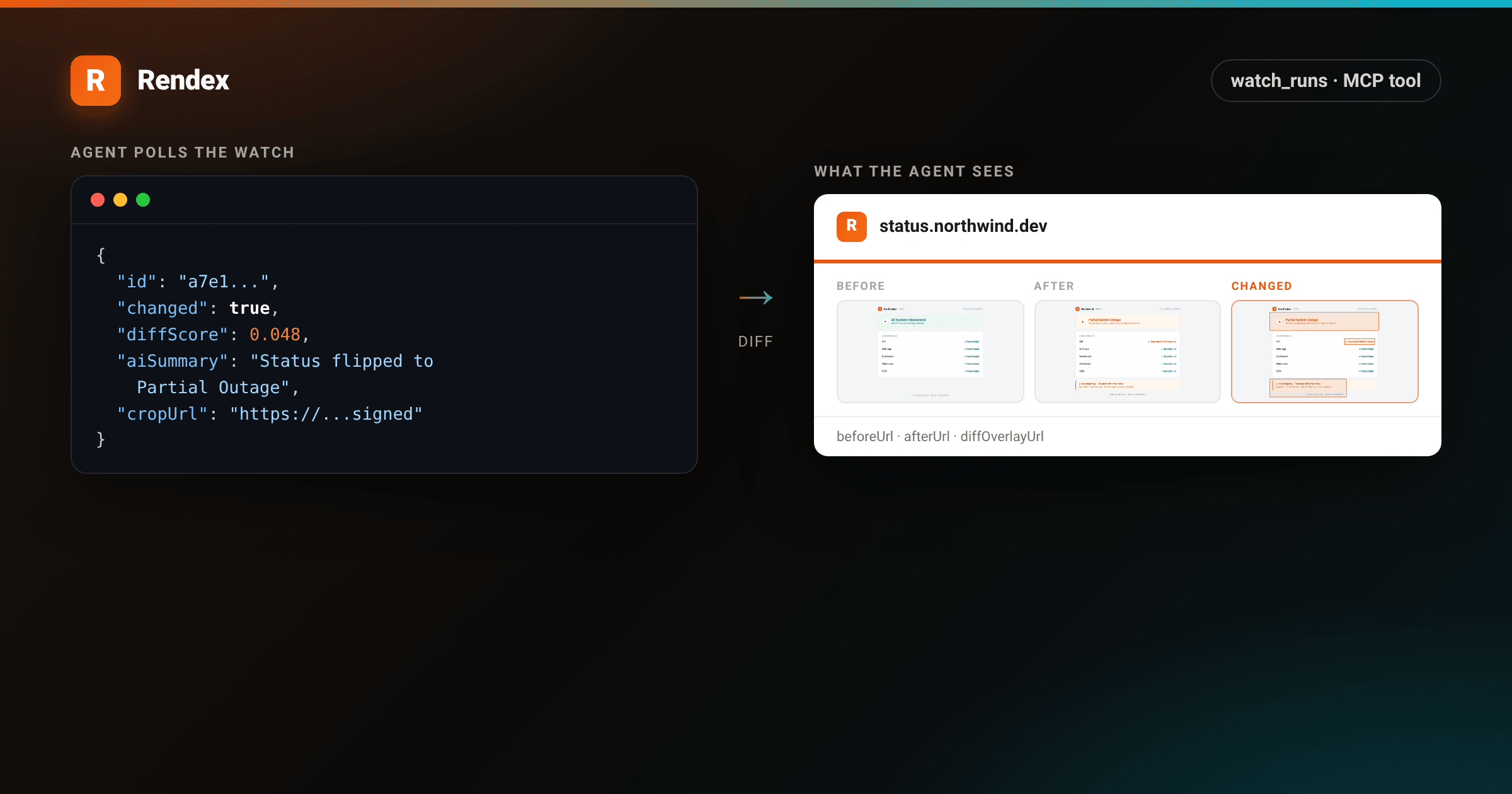
An agent that only takes a screenshot when you ask it to is stuck in the present. It can tell you what a page looks like right now, but it has no memory of what that page looked like an hour ago, so it cannot tell you that anything changed. To build an agent that notices a pricing page moved or a status page flipped red, it needs something that checks on its own schedule and remembers the last result.
That is what Rendex Watch adds to the Rendex MCP server: eight watch_*tools that let an agent create a monitor, read its run history, and react to a change, all in the same conversation it already uses to capture screenshots. This is AI agent website monitoring without a cron job, a diffing library, or a second service the agent has to call out to. Every tool and field below is verified against the MCP server's source.
Prerequisites
- An MCP client that can call tools: Claude Desktop, Claude Code, Cursor, Windsurf, or a custom agent loop.
- A Rendex API key. The free tier includes one watch on a daily check, no card required.
- The Rendex MCP server, connected locally over stdio or remotely at
mcp.rendex.dev.
Step 1: Connect the Rendex MCP server
Add the server to your client's MCP config. The local, stdio version works with Claude Desktop, Claude Code, Cursor, and Windsurf:
{
  "mcpServers": {
    "rendex": {
      "command": "npx",
      "args": ["-y", "@copperline/rendex-mcp"],
      "env": {
        "RENDEX_API_KEY": "YOUR_API_KEY"
      }
    }
  }
}
Restart the client and check its tool list. Alongside rendex_screenshot and rendex_extract, you should see watch_create, watch_test, watch_list, watch_get, watch_run, watch_runs, watch_update, and watch_delete. Full setup for every client, including the OAuth connector flow for Claude and ChatGPT, is in the MCP docs.
Step 2: Have the agent create a watch
Instead of writing the request body yourself, tell the agent what to monitor in plain language, for example "watch status.northwind.dev and let me know if the status changes." The agent fills in a watch_create call from the key fields: the url, how often to check (intervalMinutes), and how it should decide something changed (diffMode: a pixel diff, a text diff, or both).
{
  "url": "status.northwind.dev",
  "name": "Northwind status page",
  "intervalMinutes": 30,
  "diffMode": "both",
  "threshold": 0.02,
  "notifyEmail": "you@northwind.dev"
}
An active watch captures its baseline immediately, so the first result comes back in the same call. The threshold is a noise floor for the visual diff (0 to 1): the default 0.01 flags any visible change, while something like 0.06 only flags a change that moves a large share of the page. intervalMinutes has a plan floor: daily on Free, down to every 5 minutes on Enterprise, and watch_create rejects anything tighter than yours allows. Before committing to a scope, an agent can dry-run it with watch_test, which renders the config once and reports whether the page is reachable without creating a watch or charging anything.
Step 3: Poll run history and read what changed
A watch checks itself on schedule, so an agent does not have to sit in a loop waiting. When the user asks "has anything changed on the status page," the agent reads the run history instead:
{
  "id": "a7e1c4...",
  "watchId": "8f3c...",
  "status": "completed",
  "changed": true,
  "diffScore": 0.048,
  "diffPixels": 51200,
  "beforeUrl": "https://rendex.dev/i/...signed",
  "afterUrl": "https://rendex.dev/i/...signed",
  "diffOverlayUrl": "https://rendex.dev/i/...signed",
  "cropUrl": "https://rendex.dev/i/...signed",
  "aiSummary": "Status flipped to Partial Outage",
  "textDiff": { "summary": "banner text changed" }
}
changed is the first thing worth checking: if it is false, there is nothing to report and the agent can stop there. If it is true, cropUrl is the crop-to-change image, the fastest way for an agent (or a human) to see what moved without scanning a full-page screenshot, backed by the full beforeUrl, afterUrl, and diffOverlayUrl frames. aiSummary is a ready-made sentence on Pro and Enterprise plans; on other plans the agent composes its own line from diffScore and textDiff instead. Put together, that is enough for an agent to turn a raw diff into something like this:
<!DOCTYPE html>
<html lang="en">
<head>
<meta charset="utf-8">
<style>
:root { --brand: #ea580c; --brand-2: #06b6d4; }
* { box-sizing: border-box; }
body { margin: 0; }
.stage {
width: 1100px; height: 700px; position: relative; overflow: hidden;
display: flex; align-items: center; justify-content: center;
background:
radial-gradient(640px 320px at 12% -10%, rgba(234,88,12,0.18), transparent 60%),
radial-gradient(640px 320px at 92% 110%, rgba(6,182,212,0.16), transparent 60%),
linear-gradient(135deg, #1c1410 0%, #0c0a09 50%, #07171a 100%);
font-family: -apple-system, BlinkMacSystemFont, "Segoe UI", Roboto, Helvetica, Arial, sans-serif;
-webkit-font-smoothing: antialiased;
}
.card {
width: 980px; background: #ffffff; border-radius: 16px; overflow: hidden;
color: #1c1917; box-shadow: 0 30px 70px rgba(0,0,0,0.55);
}
.pbar { height: 6px; background: linear-gradient(90deg, var(--brand), var(--brand-2)); }
.pin { padding: 30px 36px 34px; }
.head { display: flex; align-items: center; gap: 12px; }
.mark { width: 36px; height: 36px; border-radius: 9px; background: linear-gradient(135deg, var(--brand), #f97316);
color: #fff; font-weight: 800; font-size: 21px; display: flex; align-items: center; justify-content: center;
box-shadow: 0 6px 16px rgba(234,88,12,0.35); }
.head .word { font-size: 19px; font-weight: 800; letter-spacing: -0.3px; color: #1c1917; }
.head .pill { margin-left: auto; font-size: 13px; font-weight: 700; color: #0e7490;
background: rgba(6,182,212,0.10); border: 1px solid rgba(6,182,212,0.25); padding: 6px 13px; border-radius: 999px; }
h2 { margin: 22px 0 4px; font-size: 23px; font-weight: 800; letter-spacing: -0.4px; }
.sub { margin: 0; font-size: 14px; color: #78716c; }
.frames { display: flex; gap: 14px; margin-top: 20px; align-items: stretch; }
.frame { flex: 1 1 0; min-width: 0; }
.flabel { font-size: 11px; letter-spacing: 1.2px; text-transform: uppercase; color: #a8a29e; font-weight: 700; margin-bottom: 8px; }
.flabel.hot { color: var(--brand); }
.shot { border-radius: 10px; overflow: hidden; border: 1px solid #e7e5e4; height: 190px; background: #f5f5f4; }
.shot.hot { border-color: rgba(234,88,12,0.55); box-shadow: 0 0 0 1px rgba(234,88,12,0.25); }
.shot img { width: 100%; height: 100%; object-fit: cover; object-position: top; display: block; }
.agent { margin-top: 22px; display: flex; gap: 12px; align-items: flex-start; background: #fafaf9;
border: 1px solid #e7e5e4; border-radius: 12px; padding: 14px 16px; }
.agent .av { flex: none; width: 28px; height: 28px; border-radius: 8px; background: linear-gradient(135deg, var(--brand-2), #0891b2);
color: #fff; font-weight: 800; font-size: 14px; display: flex; align-items: center; justify-content: center; }
.agent .line { font-size: 14.5px; line-height: 1.5; color: #292524; }
.agent .line b { color: #1c1917; }
.meta { margin-top: 16px; display: flex; align-items: center; gap: 10px; }
.badge { font-size: 13px; font-weight: 700; color: #1c1917; background: #fff; border: 1px solid #e7e5e4;
border-radius: 10px; padding: 8px 12px; }
.badge .v { color: var(--brand); }
.src { margin-left: auto; font-size: 12px; color: #a8a29e; font-family: ui-monospace, SFMono-Regular, Menlo, Consolas, monospace; }
</style>
</head>
<body>
<div class="stage">
<div class="card">
<div class="pbar"></div>
<div class="pin">
<div class="head">
<div class="mark">R</div>
<div class="word">Rendex Watch</div>
<div class="pill">watch_runs · changed: true</div>
</div>
<h2>status.northwind.dev</h2>
<p class="sub">Checked every 30 minutes · diffMode: both</p>
<div class="frames">
<div class="frame">
<div class="flabel">Before</div>
<div class="shot"><img src="https://rendex.dev/watch/status-before.png" alt="before"></div>
</div>
<div class="frame">
<div class="flabel">After</div>
<div class="shot"><img src="https://rendex.dev/watch/status-after.png" alt="after"></div>
</div>
<div class="frame">
<div class="flabel hot">What changed</div>
<div class="shot hot"><img src="https://rendex.dev/watch/status-overlay.png" alt="overlay"></div>
</div>
</div>
<div class="agent">
<div class="av">AI</div>
<div class="line">
<b>Agent:</b> status.northwind.dev flipped from Operational to a
Partial Outage banner a few minutes ago. I pulled the before/after
from the watch run, want me to open an incident?
</div>
</div>
<div class="meta">
<div class="badge"><span class="v">4.8%</span> of the page changed</div>
<div class="badge">1 region</div>
<div class="src">GET watch_runs → items[0]</div>
</div>
</div>
</div>
</div>
</body>
</html>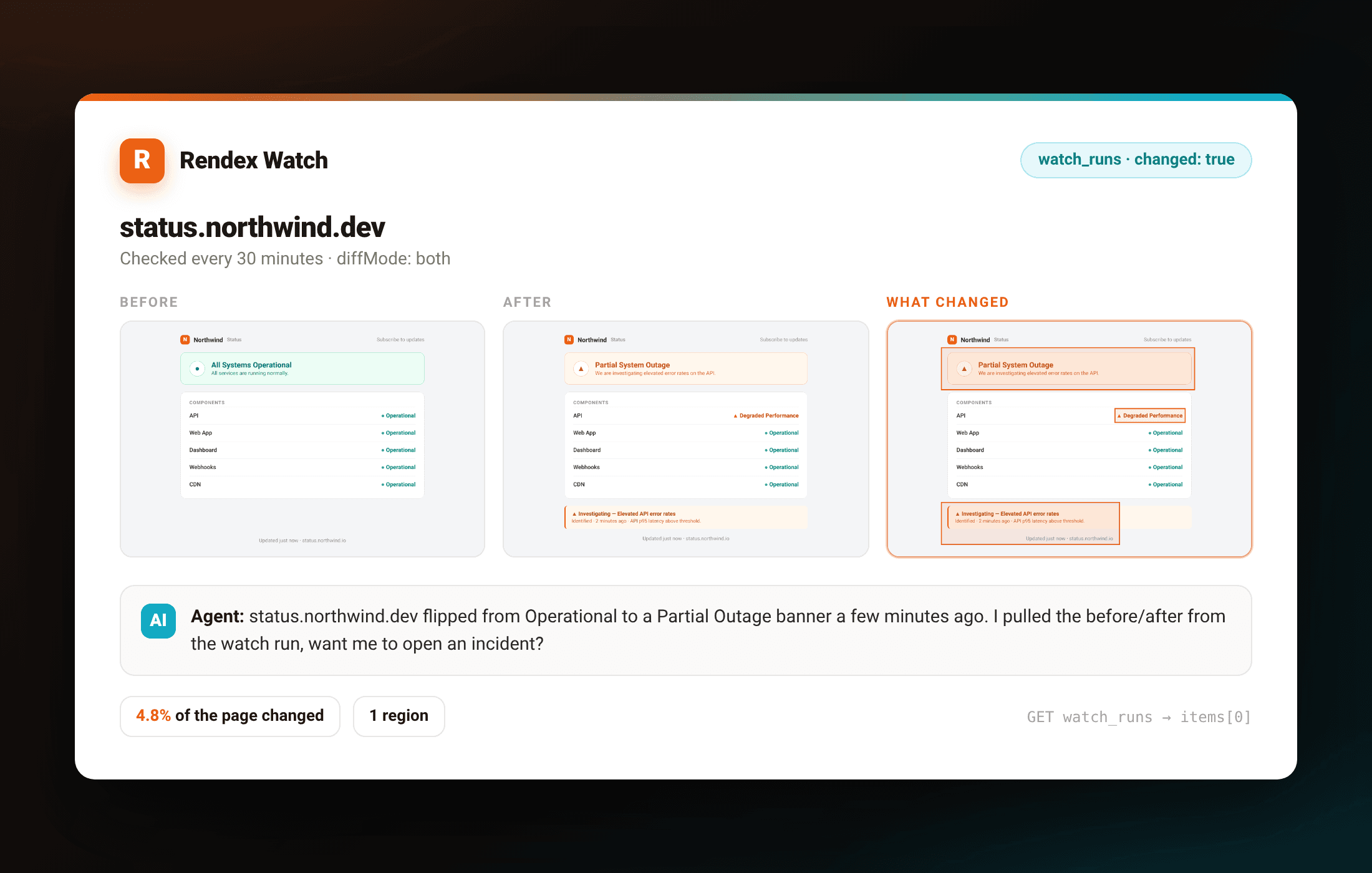
Step 4: Check right now instead of waiting
Sometimes the user wants certainty before the next scheduled check, for example right after they hear a competitor changed pricing. watch_run forces an immediate check for one credit and returns a queued run; the agent then polls watch_runs until that run's status moves from queued to completed and reads changed the same way as Step 3. To change the watch itself later, such as tightening the interval or turning on a webhook, watch_update edits it in place and only re-baselines if the scope (URL, selector, or viewport) actually changed.
For a one-off capture that is not part of an ongoing watch, for example "show me what this page looks like right now," reach for rendex_screenshot instead; the AI agent screenshots use case covers that side of the same MCP server.
Troubleshooting
watch_createrejects intervalMinutes. Each plan has a floor (daily on Free, down to 5 minutes on Enterprise). Round up to your plan's floor or upgrade.- webhookUrl or aiSummary gets rejected. Webhooks need Starter or above; the AI-written
aiSummaryline needs Pro or above.notifyEmailworks on every plan. - Watch keeps firing on noise. Raise
threshold, or scope the watch to one element withselectorinrenderParamsinstead of diffing the whole page. - Not sure what a config will capture. Run
watch_testfirst, or try the Preview a Website Watch tool in the browser before wiring it into an agent.
Ship it
An agent with watch_* access can set up its own monitoring instead of you writing a cron job and a diff script yourself: it creates the watch, reads the run history, and decides what is worth telling you about. For the full change-detection model, plan limits, and the REST and SDK surface behind these tools, see the Rendex Watch launch post and the Watch API reference. New accounts get a free watch and a free render allowance, enough to wire up the whole loop before you pay anything. Create an account and give your agent something to watch.