How to Convert Markdown to PDF with an API (2026)
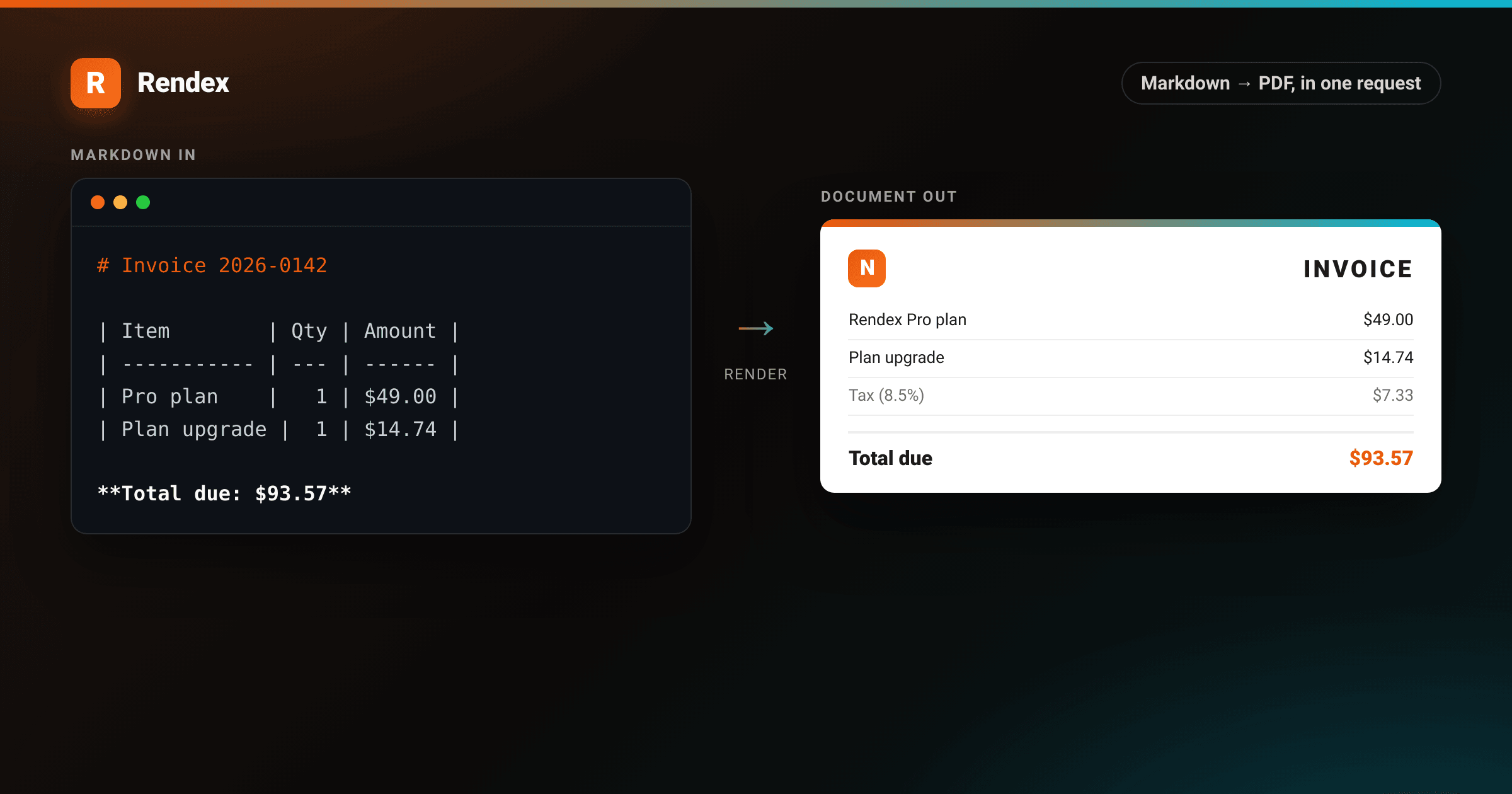
Markdown is everywhere: README files, AI-generated docs, internal notes, changelogs. When you need to ship a PDF from that content, the standard options are headless Chrome (memory leaks, cold starts, ops overhead) or a three-step pipeline that converts Markdown to HTML, then HTML to PDF, across separate services. The markdown to pdf api in Rendex collapses that to one POST request.
You pass a raw Markdown string. The API converts it to a styled HTML document server-side and renders it to a PDF or PNG. No Chromium to manage, no intermediate files, no conversion library to pin.
What you need
- An API key from rendex.dev/login (free tier: 100 calls/month)
- curl, Python 3.8+, or Node.js 18+
Step 1: Make the API call
The POST /v1/screenshot endpoint accepts a markdown field alongside url and html. The three are mutually exclusive: pick one per request.
# Get your API key at rendex.dev/login
curl -X POST https://api.rendex.dev/v1/screenshot \
  -H "Authorization: Bearer rdx_YOUR_KEY" \
  -H "Content-Type: application/json" \
  -d '{
    "markdown": "# Q2 Report\n\n## Revenue\n\n- APAC: $18k\n- EMEA: $14k",
    "format": "pdf",
    "pdfFormat": "A4",
    "pdfPrintBackground": true
  }' \
  --output report.pdf
The markdown field accepts up to 5 MB of Markdown text. The API converts it to HTML using a GitHub-flavored stylesheet before rendering, so standard Markdown syntax (headings, tables, fenced code blocks, inline code, blockquotes) renders as expected.
The format parameter controls the output type: "pdf" returns a PDF document, "png", "jpeg", and "webp" return images of the rendered page. pdfFormat accepts A4, Letter, Legal, Tabloid, and A3.
Step 2: Capture the full document
By default, the viewport height is 800px. For long Markdown documents, add fullPage: true to capture the entire rendered height rather than just the above-the-fold view. This has no effect on PDF output, which always renders full-page, but matters for PNG and JPEG.
curl -X POST https://api.rendex.dev/v1/screenshot \
  -H "Authorization: Bearer rdx_YOUR_KEY" \
  -H "Content-Type: application/json" \
  -d '{
    "markdown": "# Docs\n\n## Section 1\n\nContent here.\n\n## Section 2\n\nMore content.",
    "format": "png",
    "fullPage": true
  }' \
  --output docs.png
Step 3: Use the Python SDK
The Rendex Python SDK ships a render_markdown method that wraps the markdown to pdf api call and handles authentication, camelCase conversion, and response parsing.
# pip install rendex
from rendex import Rendex
from pathlib import Path

# Get your API key at rendex.dev/login
rendex = Rendex("rdx_YOUR_KEY")

md = """# Q2 Report

Generated: 2026-05-27

## Revenue

| Region  | Q1   | Q2   |
|---------|------|------|
| APAC    | $12k | $18k |
| EMEA    | $9k  | $14k |

## Notes

- Compare against **Q1 targets** before sharing.
- Export as PDF before the 3pm review.
"""

result = rendex.render_markdown(md, format="pdf", pdf_format="A4")
Path("q2-report.pdf").write_bytes(result.image)
print(f"PDF written: {result.metadata.bytes_size} bytes")
render_markdown is a convenience wrapper over screenshot(markdown=...). Both accept the same keyword arguments in snake_case, which the SDK converts to camelCase before sending the request.
Step 4: Use the JavaScript SDK
The TypeScript SDK on npm (@copperline/rendex) exposes renderMarkdown, a typed wrapper over screenshot({ markdown }).
// npm install @copperline/rendex
import { Rendex } from "@copperline/rendex";
import { writeFile } from "node:fs/promises";

// Get your API key at rendex.dev/login
const rendex = new Rendex("rdx_YOUR_KEY");

const markdown = `# Release Notes

## v2.1.0

- Fixed auth timeout on long requests
- Added batch capture support (up to 500 URLs per job)
- Improved PDF margin defaults

## v2.0.0

Breaking change: \`format\` now defaults to \`png\` instead of \`jpeg\`.
`;

const { image } = await rendex.renderMarkdown(markdown, {
  format: "pdf",
  pdfFormat: "A4",
  pdfPrintBackground: true,
});

await writeFile("release-notes.pdf", Buffer.from(image));
console.log("release-notes.pdf written");
Step 5: Override the default styles
The default stylesheet is GitHub-flavored: 16px system font, max-width: 768px, bordered H1 and H2, code blocks with a light gray background. To match your brand, pass a css string (up to 50 KB). It is injected after the default stylesheet, so it wins the cascade.
curl -X POST https://api.rendex.dev/v1/screenshot \
  -H "Authorization: Bearer rdx_YOUR_KEY" \
  -H "Content-Type: application/json" \
  -d '{
    "markdown": "# Custom Report\n\nStyled with custom CSS.",
    "format": "pdf",
    "css": "body.rendex-markdown { max-width: 960px; font-size: 14px; } body.rendex-markdown h1 { color: #ea580c; border-bottom-color: #ea580c; }"
  }' \
  --output styled.pdf
Target body.rendex-markdown to override the container, or use any standard CSS selector. If you want to load a web font, include a @import at the top of the css string and keep the URL publicly accessible so the renderer can fetch it.
What you can generate
Markdown mode gives you clean GitHub styling out of the box. Layer a css string on top, or switch to html mode, and the same render pipeline turns plain input into production documents: invoices, reports, certificates, packing slips. Below are two examples, each rendered by Rendex from the exact markup shown beside it.
<!DOCTYPE html>
<html lang="en">
<head>
<meta charset="utf-8">
<style>
:root {
--brand: #ea580c;
--brand-2: #06b6d4;
--ink: #1c1917;
--muted: #78716c;
--line: #e7e5e4;
--tint: #f5f3f0;
}
* { box-sizing: border-box; }
body {
margin: 0;
background:
radial-gradient(1200px 500px at 80% -10%, rgba(234,88,12,0.10), transparent 60%),
var(--tint);
font-family: -apple-system, BlinkMacSystemFont, "Segoe UI", Roboto, Helvetica, Arial, sans-serif;
color: var(--ink);
padding: 64px 56px;
-webkit-font-smoothing: antialiased;
font-variant-numeric: tabular-nums;
}
.page {
max-width: 760px;
margin: 0 auto;
background: #fff;
border-radius: 6px;
box-shadow: 0 24px 60px rgba(28,25,23,0.16), 0 2px 6px rgba(28,25,23,0.06);
overflow: hidden;
}
.bar { height: 8px; background: linear-gradient(90deg, var(--brand) 0%, var(--brand-2) 100%); }
.pad { padding: 48px 52px; }
.top { display: flex; justify-content: space-between; align-items: flex-start; }
.brand { display: flex; align-items: center; gap: 14px; }
.logo {
width: 46px; height: 46px; border-radius: 11px;
background: linear-gradient(135deg, var(--brand), #f97316);
color: #fff; font-weight: 800; font-size: 26px;
display: flex; align-items: center; justify-content: center;
box-shadow: 0 6px 16px rgba(234,88,12,0.35);
}
.brand .name { font-size: 19px; font-weight: 700; letter-spacing: -0.2px; }
.brand .sub { font-size: 13px; color: var(--muted); }
.doc h1 { margin: 0; font-size: 32px; letter-spacing: 3px; color: var(--ink); font-weight: 800; text-align: right; }
.doc .meta { margin-top: 6px; font-size: 13px; color: var(--muted); text-align: right; line-height: 1.7; }
.doc .meta b { color: var(--ink); font-weight: 600; }
.parties { display: flex; gap: 40px; margin: 40px 0 28px; }
.parties .label { font-size: 11px; letter-spacing: 1.2px; text-transform: uppercase; color: var(--muted); margin-bottom: 7px; }
.parties .who { font-size: 15px; line-height: 1.55; }
.parties .who b { font-weight: 700; }
table { width: 100%; border-collapse: collapse; margin-top: 8px; }
thead th {
text-align: left; font-size: 11px; letter-spacing: 1px; text-transform: uppercase;
color: var(--muted); padding: 12px 14px; border-bottom: 2px solid var(--line);
}
thead th.r, tbody td.r { text-align: right; }
tbody td { padding: 14px; font-size: 15px; border-bottom: 1px solid var(--line); }
tbody tr:nth-child(2n) td { background: #faf9f7; }
tbody td .desc { color: var(--muted); font-size: 13px; margin-top: 2px; }
.totals { margin-top: 22px; display: flex; justify-content: flex-end; }
.totals table { width: 320px; }
.totals td { padding: 9px 14px; font-size: 15px; border: 0; }
.totals td.lbl { color: var(--muted); }
.totals td.val { text-align: right; }
.totals tr.grand td { border-top: 2px solid var(--line); padding-top: 14px; font-size: 19px; font-weight: 800; }
.totals tr.grand td.val { color: var(--brand); }
.badge {
display: inline-block; margin-top: 4px; padding: 5px 12px; border-radius: 999px;
background: rgba(6,182,212,0.12); color: #0e7490; font-size: 12px; font-weight: 700; letter-spacing: 0.4px;
}
.foot { margin-top: 40px; padding-top: 20px; border-top: 1px solid var(--line); display: flex; justify-content: space-between; font-size: 12px; color: var(--muted); }
</style>
</head>
<body>
<div class="page">
<div class="bar"></div>
<div class="pad">
<div class="top">
<div class="brand">
<div class="logo">N</div>
<div>
<div class="name">Northwind Labs</div>
<div class="sub">14 Harbour Street, Portland, OR 97201</div>
</div>
</div>
<div class="doc">
<h1>INVOICE</h1>
<div class="meta">
No. <b>2026‑0142</b><br>
Issued <b>May 27, 2026</b> · Due <b>Jun 26, 2026</b>
</div>
</div>
</div>
<div class="parties">
<div>
<div class="label">Billed to</div>
<div class="who"><b>Acme Robotics, Inc.</b><br>Billing Dept.<br>2200 Mission College Blvd<br>Santa Clara, CA 95054</div>
</div>
<div>
<div class="label">Account</div>
<div class="who"><b>acme‑robotics</b><br>Rendex Pro plan<br>Cycle: May 2026<br><span class="badge">Net 30</span></div>
</div>
</div>
<table>
<thead>
<tr><th>Description</th><th class="r">Qty</th><th class="r">Rate</th><th class="r">Amount</th></tr>
</thead>
<tbody>
<tr><td>Rendex Pro plan<div class="desc">Monthly subscription · 100,000 renders</div></td><td class="r">1</td><td class="r">$49.00</td><td class="r">$49.00</td></tr>
<tr><td>Plan upgrade<div class="desc">Mid‑cycle proration</div></td><td class="r">1</td><td class="r">$14.74</td><td class="r">$14.74</td></tr>
<tr><td>Geo‑targeted captures<div class="desc">Residential proxy, 5 regions</div></td><td class="r">1,250</td><td class="r">$0.0020</td><td class="r">$2.50</td></tr>
<tr><td>Priority support<div class="desc">Add‑on</div></td><td class="r">1</td><td class="r">$20.00</td><td class="r">$20.00</td></tr>
</tbody>
</table>
<div class="totals">
<table>
<tr><td class="lbl">Subtotal</td><td class="val">$86.24</td></tr>
<tr><td class="lbl">Tax (8.5%)</td><td class="val">$7.33</td></tr>
<tr class="grand"><td class="lbl">Total due</td><td class="val">$93.57</td></tr>
</table>
</div>
<div class="foot">
<div>Thank you for building with Rendex.</div>
<div>Questions? billing@northwindlabs.example</div>
</div>
</div>
</div>
</body>
</html>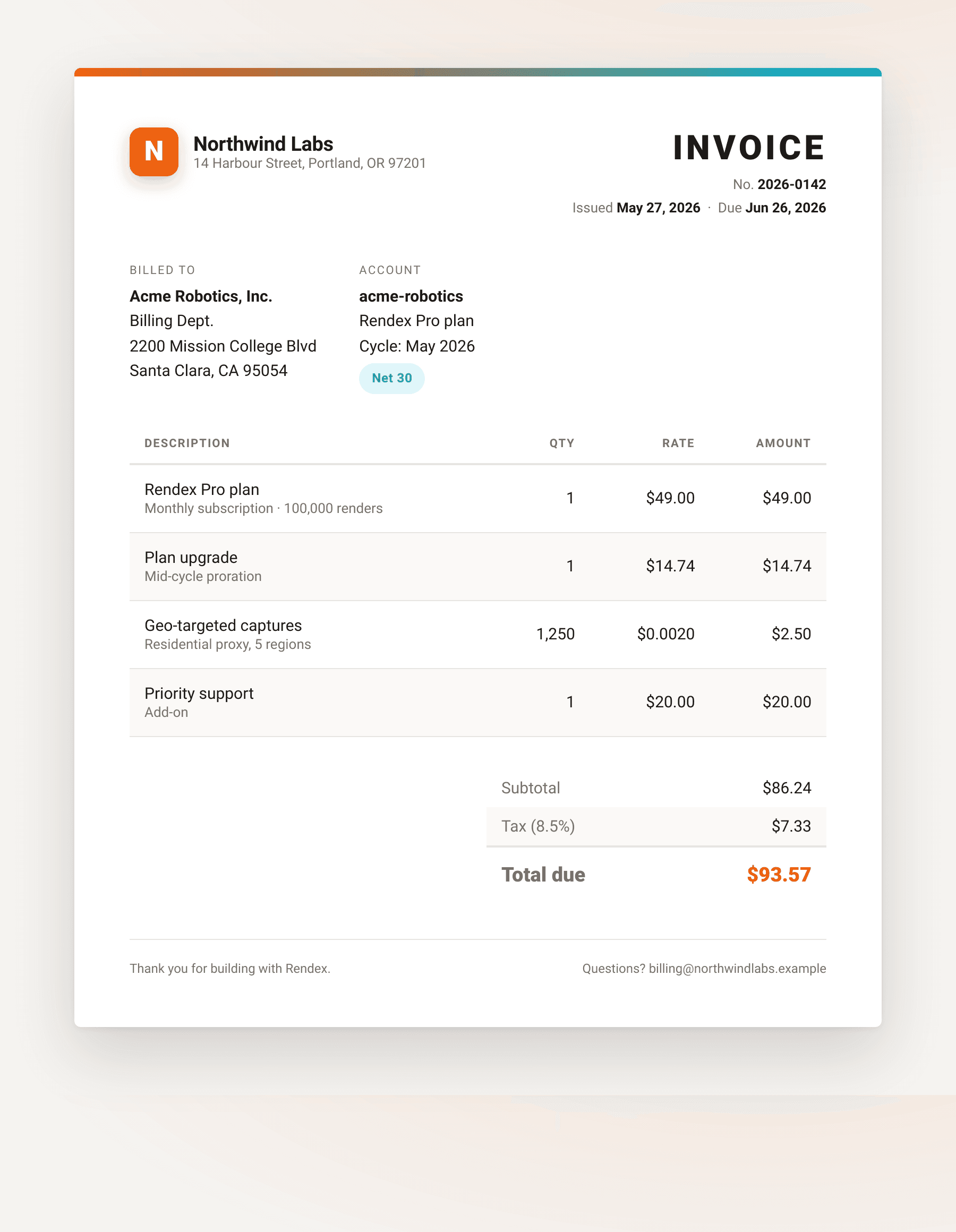
The pipeline handles long-form documents just as well. Here a product changelog becomes a branded release note. Author the body in Markdown and theme it with a css string, or hand Rendex finished HTML like this. Either path hits the same renderer.
<!DOCTYPE html>
<html lang="en">
<head>
<meta charset="utf-8">
<style>
:root {
--brand: #ea580c;
--brand-2: #06b6d4;
--ink: #1c1917;
--muted: #78716c;
--line: #e7e5e4;
--tint: #f5f3f0;
}
* { box-sizing: border-box; }
body {
margin: 0;
background:
radial-gradient(1100px 460px at 15% -10%, rgba(6,182,212,0.10), transparent 60%),
var(--tint);
font-family: -apple-system, BlinkMacSystemFont, "Segoe UI", Roboto, Helvetica, Arial, sans-serif;
color: var(--ink);
padding: 64px 56px;
-webkit-font-smoothing: antialiased;
}
.page {
max-width: 760px; margin: 0 auto; background: #fff; border-radius: 6px;
box-shadow: 0 24px 60px rgba(28,25,23,0.16), 0 2px 6px rgba(28,25,23,0.06);
overflow: hidden;
}
.head {
padding: 36px 52px 30px;
background: linear-gradient(135deg, #1c1917 0%, #2b1a10 55%, #07171a 100%);
color: #fff; position: relative; overflow: hidden;
}
.head::after {
content: ""; position: absolute; right: -80px; top: -80px; width: 260px; height: 260px;
background: radial-gradient(circle, rgba(234,88,12,0.45), transparent 65%); border-radius: 50%;
}
.eyebrow { font-size: 12px; letter-spacing: 2px; text-transform: uppercase; color: #fdba74; font-weight: 700; }
.head h1 { margin: 8px 0 0; font-size: 34px; letter-spacing: -0.5px; font-weight: 800; }
.verrow { margin-top: 14px; display: flex; align-items: center; gap: 12px; position: relative; z-index: 1; }
.pill { padding: 5px 13px; border-radius: 999px; font-size: 13px; font-weight: 700;
background: linear-gradient(90deg, var(--brand), #f97316); color: #fff; }
.verrow .date { font-size: 13px; color: #d6d3d1; }
.pad { padding: 36px 52px 46px; }
h2 { font-size: 15px; letter-spacing: 0.4px; text-transform: uppercase; color: var(--muted); margin: 0 0 14px; }
.section { margin-bottom: 30px; }
.feat { display: flex; gap: 14px; padding: 12px 0; border-bottom: 1px solid var(--line); }
.feat:last-child { border-bottom: 0; }
.dot { flex: none; width: 9px; height: 9px; border-radius: 50%; margin-top: 7px;
background: linear-gradient(135deg, var(--brand), var(--brand-2)); }
.feat .t { font-size: 15.5px; font-weight: 650; }
.feat .d { font-size: 14px; color: var(--muted); line-height: 1.5; margin-top: 2px; }
code { font-family: ui-monospace, SFMono-Regular, Menlo, Consolas, monospace; font-size: 88%;
background: rgba(234,88,12,0.10); color: #c2410c; padding: 2px 6px; border-radius: 5px; }
table { width: 100%; border-collapse: collapse; border: 1px solid var(--line); border-radius: 8px; overflow: hidden; }
thead th { text-align: left; font-size: 12px; letter-spacing: 0.6px; text-transform: uppercase;
padding: 12px 16px; background: #1c1917; color: #fafaf9; }
tbody td { padding: 12px 16px; font-size: 14.5px; border-top: 1px solid var(--line); }
tbody tr:nth-child(2n) td { background: #faf9f7; }
.foot { margin-top: 8px; padding-top: 18px; border-top: 1px solid var(--line);
font-size: 12.5px; color: var(--muted); display: flex; justify-content: space-between; }
</style>
</head>
<body>
<div class="page">
<div class="head">
<div class="eyebrow">Release notes</div>
<h1>Rendering API v2.3</h1>
<div class="verrow">
<span class="pill">New · Markdown input</span>
<span class="date">May 27, 2026</span>
</div>
</div>
<div class="pad">
<div class="section">
<h2>What's new</h2>
<div class="feat"><div class="dot"></div><div><div class="t">Markdown as a source format</div><div class="d">Pass a <code>markdown</code> string and get back a styled PDF or PNG. GitHub-flavored tables, lists, and code blocks render server-side.</div></div></div>
<div class="feat"><div class="dot"></div><div><div class="t">Bring your own theme</div><div class="d">Layer a <code>css</code> string on top to brand the output. This page was generated from Markdown plus a CSS theme.</div></div></div>
<div class="feat"><div class="dot"></div><div><div class="t">Mustache templating</div><div class="d">Fill <code>{{placeholders}}</code> from a <code>data</code> object to generate invoices, reports, and certificates from one template.</div></div></div>
</div>
<div class="section">
<h2>Parameters</h2>
<table>
<thead><tr><th>Field</th><th>Type</th><th>Description</th></tr></thead>
<tbody>
<tr><td><code>markdown</code></td><td>string</td><td>Markdown source, up to 5 MB. Mutually exclusive with <code>url</code> / <code>html</code>.</td></tr>
<tr><td><code>format</code></td><td>enum</td><td><code>png</code> · <code>jpeg</code> · <code>webp</code> · <code>pdf</code></td></tr>
<tr><td><code>css</code></td><td>string</td><td>Custom styles applied after the default stylesheet.</td></tr>
<tr><td><code>data</code></td><td>object</td><td>Values injected into <code>{{placeholders}}</code> before render.</td></tr>
</tbody>
</table>
</div>
<div class="foot"><span>Rendex Rendering API</span><span>rendex.dev/changelog</span></div>
</div>
</div>
</body>
</html>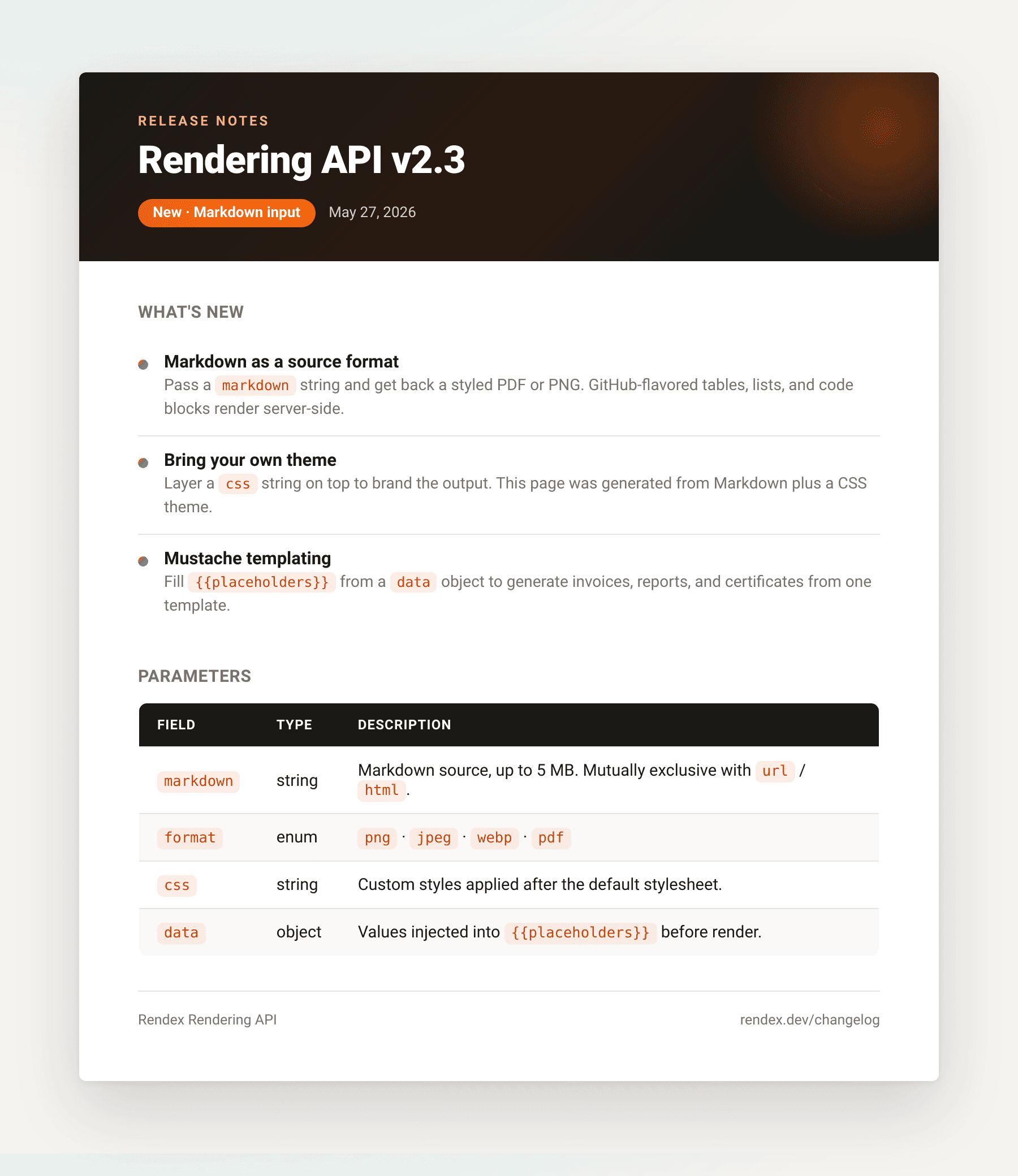
Markdown mode vs HTML mode
Use the markdown parameter when your source is already Markdown and the default GitHub styling is close enough. Use the html parameter when you need precise control over layout, custom fonts loaded from a CDN, or pixel-level design fidelity. The markdown pipeline adds a conversion step; HTML mode passes your markup directly to the renderer. Either way, the css parameter can push styles on top.
Both modes support Mustache templating via the data parameter. Pass {"data": {"name": "Alice"}} alongside your markdown string and use {{name}} in the Markdown body. The server fills the template before rendering. See the Markdown-to-Image tool to try this in the browser without writing any code.
Troubleshooting
VALIDATION_ERROR: Provide exactly one of 'url', 'html', or 'markdown' : the request body includes more than one source field. Remove url or html if you are using markdown.
PAYLOAD_TOO_LARGE : the Markdown string exceeds 5 MB, or the data object exceeds 256 KB serialized. Split large documents or trim the data payload.
Tables or fenced code blocks not rendering: the default parser enables HTML mode so embedded HTML tags render as authored. Tables use standard GFM syntax (pipe-separated). Indented code blocks work, but fenced blocks with a language identifier (` ```python `) render without syntax highlighting; syntax coloring requires custom CSS or a client-side library.
Font not loading in rendered output: the renderer fetches web fonts from the URL in your @import statement. If the font domain requires authentication or uses a private CDN, the renderer falls back to the system font. Use a public URL.
PDF missing page breaks between sections: add a CSS page-break rule to the css param: h2 { page-break-before: always; }. The first H2 in the document will still start on page one; subsequent H2s will open new pages.
Next steps
The markdown to pdf api is one input mode of the same rendering pipeline. The same endpoint accepts a URL or raw HTML. For URL-to-PDF patterns in Python, see URL to PDF with Python.
To try Markdown rendering in the browser without an API key, use the Markdown-to-Image tool. Paste your content, pick PNG or PDF, and download the result.
Start for free at rendex.dev/login. The free tier covers 100 calls/month. No credit card required.
Continue Reading
Sep 8, 2026
Extract Clean Article Text from Any URL
Aug 25, 2026
How to Convert URLs to PDF in Node.js
Jun 9, 2026
Generate Invoices from an HTML Template and JSON
Solution
Markdown to Image & PDF API — Render Markdown Without Writing CSS
Solution
URL to PDF API — Convert Any Webpage to PDF
Documentation
Api Reference
Documentation
Sdks
Free Tool
Markdown To Image Tool