Generate Invoices from an HTML Template and JSON
The same HTML template that produces one invoice can produce a thousand. Write the structure once with Mustache {{placeholders}}, then pass a different data object per document. One API call renders each output as a PDF or image. No template engine to install, no intermediate HTML files, no Chromium to manage.
This approach works for any document that changes only the data, not the layout: invoices, certificates, order confirmations, payroll stubs, or monthly reports. The free template renderer on the Rendex site lets you paste a template and data JSON to see the rendered output before writing any code.
What you need
- A Rendex API key from rendex.dev/login (100 free calls/month, no credit card required)
- curl, Python 3.8+, or Node.js 18+
Step 1: Write the HTML template
The html field in the POST /v1/screenshot endpoint accepts a Mustache template. Variables use double curly braces: {{customer}} outputs the HTML-escaped value of customer from your data object. The {{#items}}...{{/items}} section syntax iterates over a JSON array, repeating the block once per item.
<!DOCTYPE html>
<html>
<head>
<style>
body { font-family: -apple-system, sans-serif; color: #1c1917; padding: 40px 52px; }
.header { display: flex; justify-content: space-between; align-items: flex-start;
margin-bottom: 36px; }
h1 { font-size: 30px; font-weight: 800; letter-spacing: 3px; margin: 0; }
.number { font-size: 12px; color: #78716c; margin-top: 6px; }
.company { font-size: 18px; font-weight: 700; }
.sub { font-size: 12px; color: #78716c; }
table { width: 100%; border-collapse: collapse; margin-top: 24px; }
th { text-align: left; font-size: 11px; letter-spacing: 1px; text-transform: uppercase;
color: #78716c; padding: 10px 12px; border-bottom: 2px solid #e7e5e4; }
td { padding: 12px; border-bottom: 1px solid #e7e5e4; font-size: 14px; }
.r { text-align: right; }
.total { text-align: right; font-size: 20px; font-weight: 800;
color: #ea580c; margin-top: 20px; }
</style>
</head>
<body>
<div class="header">
<div>
<div class="company">{{company}}</div>
<div class="sub">{{company_address}}</div>
</div>
<div style="text-align:right">
<h1>INVOICE</h1>
<div class="number">No. {{number}} · Due {{due_date}}</div>
</div>
</div>
<p><strong>Billed to:</strong> {{customer}}</p>
<table>
<thead>
<tr><th>Description</th><th class="r">Amount</th></tr>
</thead>
<tbody>
{{#items}}
<tr>
<td>{{description}}</td>
<td class="r">{{amount}}</td>
</tr>
{{/items}}
</tbody>
</table>
<div class="total">Total due: {{total}}</div>
</body>
</html>Save this file as invoice-template.html. You will pass its contents as the html field at render time.
Step 2: Render the first document
Pass the template as html and your data values as data in a single POST. The API applies the Mustache substitution server-side before capture, so what the browser sees is fully rendered HTML with no raw {{vars}} visible:
# Replace rdx_YOUR_KEY — get your key at rendex.dev/login
curl -X POST https://api.rendex.dev/v1/screenshot \
  -H "Authorization: Bearer rdx_YOUR_KEY" \
  -H "Content-Type: application/json" \
  -d '{
    "html": "<h1>Invoice {{number}}</h1><p>Billed to: {{customer}}</p><p>Total: {{total}}</p>",
    "data": {
      "number": "INV-2026-042",
      "customer": "Meridian Software, Inc.",
      "total": "$77.64"
    },
    "format": "pdf",
    "pdfFormat": "A4",
    "pdfPrintBackground": true
  }' --output INV-2026-042.pdf
In practice you store the template in a file and read it at runtime. Here is the same call using the Python SDK:
# pip install rendex
from rendex import Rendex
from pathlib import Path

client = Rendex("rdx_YOUR_KEY")  # Get your key at rendex.dev/login

with open("invoice-template.html") as f:
    template = f.read()

data = {
    "company": "Clearwater Design",
    "company_address": "42 Harbour Street, Portland OR 97201",
    "number": "INV-2026-042",
    "due_date": "Jun 27, 2026",
    "customer": "Meridian Software, Inc.",
    "items": [
        {"description": "Pro plan subscription", "amount": "$49.00"},
        {"description": "Plan upgrade (prorated)", "amount": "$2.56"},
        {"description": "Priority support add-on", "amount": "$20.00"},
    ],
    "total": "$77.64",
}

result = client.screenshot(
    html=template,
    data=data,
    format="pdf",
    pdf_format="A4",
    pdf_print_background=True,
)
Path("INV-2026-042.pdf").write_bytes(result.image)
print(f"Saved {result.metadata.bytes_size} bytes")
Step 3: Generate many documents from one template
The template stays constant. Only the data changes. Loop over your records and call the API once per document. This is the core of the generate PDF from template pattern: one layout definition, N rendered outputs without duplicating HTML:
from rendex import Rendex
from pathlib import Path

client = Rendex("rdx_YOUR_KEY")

with open("invoice-template.html") as f:
    template = f.read()

invoice_records = [
    {
        "company": "Clearwater Design",
        "company_address": "42 Harbour Street, Portland OR 97201",
        "number": "INV-2026-042",
        "due_date": "Jun 27, 2026",
        "customer": "Meridian Software, Inc.",
        "items": [
            {"description": "Pro plan subscription", "amount": "$49.00"},
            {"description": "Plan upgrade (prorated)", "amount": "$2.56"},
            {"description": "Priority support add-on", "amount": "$20.00"},
        ],
        "total": "$77.64",
    },
    {
        "company": "Clearwater Design",
        "company_address": "42 Harbour Street, Portland OR 97201",
        "number": "INV-2026-043",
        "due_date": "Jun 27, 2026",
        "customer": "Orbis Analytics",
        "items": [
            {"description": "Starter plan subscription", "amount": "$19.00"},
        ],
        "total": "$19.00",
    },
]

for record in invoice_records:
    result = client.screenshot(
        html=template,
        data=record,
        format="pdf",
        pdf_format="A4",
        pdf_print_background=True,
    )
    Path(f"{record['number']}.pdf").write_bytes(result.image)
    print(f"Saved {record['number']}.pdf")
For large batches, add async_=True and a webhook_url. The API queues each render and POSTs the result to your endpoint as it completes, so your script returns immediately instead of blocking on each PDF.
<!DOCTYPE html>
<html lang="en">
<head>
<meta charset="utf-8">
<style>
:root {
--brand: #ea580c;
--brand-2: #06b6d4;
--ink: #1c1917;
--muted: #78716c;
--line: #e7e5e4;
--tint: #f5f3f0;
}
* { box-sizing: border-box; }
body {
margin: 0;
background:
radial-gradient(1100px 480px at 75% -8%, rgba(234,88,12,0.09), transparent 60%),
var(--tint);
font-family: -apple-system, BlinkMacSystemFont, "Segoe UI", Roboto, Helvetica, Arial, sans-serif;
color: var(--ink);
padding: 64px 56px;
-webkit-font-smoothing: antialiased;
font-variant-numeric: tabular-nums;
}
.page {
max-width: 760px;
margin: 0 auto;
background: #fff;
border-radius: 6px;
box-shadow: 0 24px 60px rgba(28,25,23,0.16), 0 2px 6px rgba(28,25,23,0.06);
overflow: hidden;
}
.bar { height: 8px; background: linear-gradient(90deg, var(--brand) 0%, var(--brand-2) 100%); }
.pad { padding: 48px 52px; }
.top { display: flex; justify-content: space-between; align-items: flex-start; }
.brand { display: flex; align-items: center; gap: 14px; }
.logo {
width: 44px; height: 44px; border-radius: 10px;
background: linear-gradient(135deg, var(--brand), #f97316);
color: #fff; font-weight: 800; font-size: 22px;
display: flex; align-items: center; justify-content: center;
box-shadow: 0 6px 16px rgba(234,88,12,0.32);
}
.brand .name { font-size: 18px; font-weight: 700; letter-spacing: -0.2px; }
.brand .sub { font-size: 12px; color: var(--muted); margin-top: 2px; }
.doc h1 { margin: 0; font-size: 30px; letter-spacing: 3px; color: var(--ink); font-weight: 800; text-align: right; }
.doc .meta { margin-top: 6px; font-size: 12px; color: var(--muted); text-align: right; line-height: 1.7; }
.doc .meta b { color: var(--ink); font-weight: 600; }
.parties { display: flex; gap: 40px; margin: 40px 0 28px; }
.parties .label { font-size: 11px; letter-spacing: 1.2px; text-transform: uppercase; color: var(--muted); margin-bottom: 6px; }
.parties .who { font-size: 14px; line-height: 1.6; }
.parties .who b { font-weight: 700; }
table { width: 100%; border-collapse: collapse; margin-top: 8px; }
thead th {
text-align: left; font-size: 11px; letter-spacing: 1px; text-transform: uppercase;
color: var(--muted); padding: 10px 12px; border-bottom: 2px solid var(--line);
}
thead th.r, tbody td.r { text-align: right; }
tbody td { padding: 13px 12px; font-size: 14px; border-bottom: 1px solid var(--line); }
tbody tr:nth-child(2n) td { background: #faf9f7; }
tbody td .desc { color: var(--muted); font-size: 12px; margin-top: 2px; }
.totals { margin-top: 20px; display: flex; justify-content: flex-end; }
.totals table { width: 300px; }
.totals td { padding: 8px 12px; font-size: 14px; border: 0; }
.totals td.lbl { color: var(--muted); }
.totals td.val { text-align: right; }
.totals tr.grand td { border-top: 2px solid var(--line); padding-top: 12px; font-size: 18px; font-weight: 800; }
.totals tr.grand td.val { color: var(--brand); }
.badge {
display: inline-block; margin-top: 4px; padding: 4px 10px; border-radius: 999px;
background: rgba(6,182,212,0.12); color: #0e7490; font-size: 11px; font-weight: 700; letter-spacing: 0.4px;
}
.foot { margin-top: 36px; padding-top: 18px; border-top: 1px solid var(--line); display: flex; justify-content: space-between; font-size: 11px; color: var(--muted); }
</style>
</head>
<body>
<div class="page">
<div class="bar"></div>
<div class="pad">
<div class="top">
<div class="brand">
<div class="logo">C</div>
<div>
<div class="name">Clearwater Design</div>
<div class="sub">42 Harbour Street, Portland OR 97201</div>
</div>
</div>
<div class="doc">
<h1>INVOICE</h1>
<div class="meta">
No. <b>INV‑2026‑042</b><br>
Issued <b>May 28, 2026</b> · Due <b>Jun 27, 2026</b>
</div>
</div>
</div>
<div class="parties">
<div>
<div class="label">Billed to</div>
<div class="who"><b>Meridian Software, Inc.</b><br>Accounts Payable<br>800 Oak Ave, Suite 400<br>San Jose, CA 95110</div>
</div>
<div>
<div class="label">Account</div>
<div class="who"><b>meridian‑software</b><br>Rendex Pro plan<br>Cycle: May 2026<br><span class="badge">Net 30</span></div>
</div>
</div>
<table>
<thead>
<tr><th>Description</th><th class="r">Qty</th><th class="r">Rate</th><th class="r">Amount</th></tr>
</thead>
<tbody>
<tr><td>Pro plan subscription<div class="desc">Monthly · 100,000 renders included</div></td><td class="r">1</td><td class="r">$49.00</td><td class="r">$49.00</td></tr>
<tr><td>Plan upgrade<div class="desc">Mid‑cycle proration</div></td><td class="r">1</td><td class="r">$2.56</td><td class="r">$2.56</td></tr>
<tr><td>Priority support add‑on<div class="desc">Month of May 2026</div></td><td class="r">1</td><td class="r">$20.00</td><td class="r">$20.00</td></tr>
</tbody>
</table>
<div class="totals">
<table>
<tr><td class="lbl">Subtotal</td><td class="val">$71.56</td></tr>
<tr><td class="lbl">Tax (8.5%)</td><td class="val">$6.08</td></tr>
<tr class="grand"><td class="lbl">Total due</td><td class="val">$77.64</td></tr>
</table>
</div>
<div class="foot">
<div>Thank you for building with Clearwater Design.</div>
<div>Questions? billing@clearwaterdesign.example</div>
</div>
</div>
</div>
</body>
</html>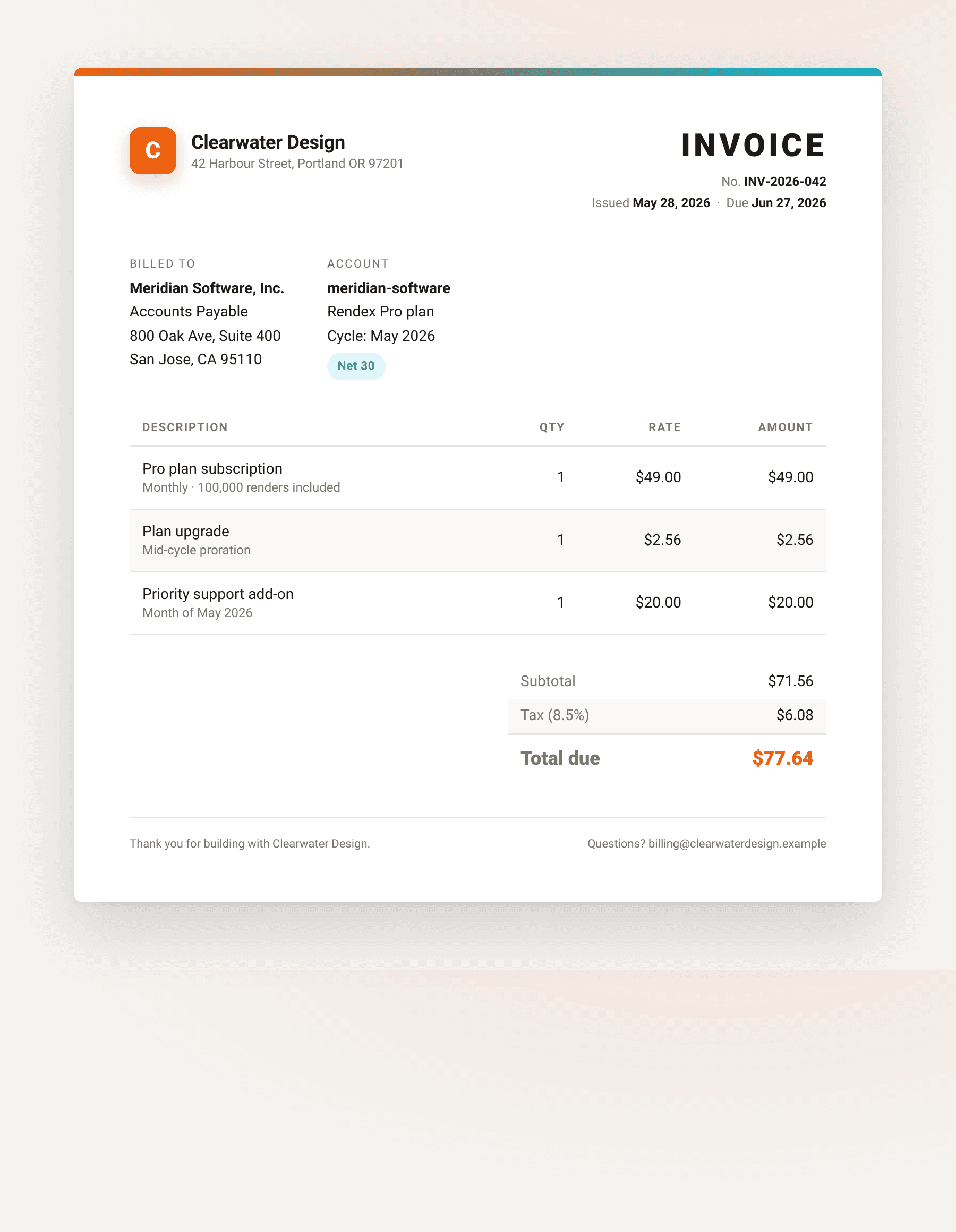
TypeScript / Node.js
The JS/TS SDK accepts the same data field:
// npm install @copperline/rendex
import { Rendex } from "@copperline/rendex"
import { readFileSync, writeFileSync } from "fs"

const rendex = new Rendex("rdx_YOUR_KEY")  // Get your key at rendex.dev/login

const template = readFileSync("invoice-template.html", "utf-8")

const records = [
  {
    company: "Clearwater Design",
    company_address: "42 Harbour Street, Portland OR 97201",
    number: "INV-2026-042",
    due_date: "Jun 27, 2026",
    customer: "Meridian Software, Inc.",
    items: [
      { description: "Pro plan subscription", amount: "$49.00" },
      { description: "Plan upgrade (prorated)", amount: "$2.56" },
      { description: "Priority support add-on", amount: "$20.00" },
    ],
    total: "$77.64",
  },
]

for (const record of records) {
  const { image } = await rendex.screenshot({
    html: template,
    data: record,
    format: "pdf",
    pdfFormat: "A4",
    pdfPrintBackground: true,
  })
  writeFileSync(`${record.number}.pdf`, Buffer.from(image))
  console.log(`Saved ${record.number}.pdf`)
}
Troubleshooting
Placeholders appear in the output ({{customer}} shows as-is): The field name in the template does not match the key in your data object. Keys are case-sensitive. Check for typos on both sides.
Array section renders no rows: The items value must be a JSON array, not a string. An empty array renders no rows but does not error. A non-array value causes the section to be skipped.
HTML characters appearing escaped in output: Double-brace syntax {{var}} HTML-escapes the value, so & in a company name renders safely as text. If you are injecting a fragment of HTML markup that you control, use triple braces: {{{trusted_html}}}.
422 validation error on the data field: The data parameter is only valid with html or markdown sources. Passing data alongside a url is not supported.
Next steps
The HTML-to-PDF invoice pipeline post extends this pattern with a full Stripe webhook integration: trigger a PDF render on payment, store the file in R2, and email the signed URL to the customer.
To generate PDF from template without code, use the free template renderer: paste your HTML with Mustache placeholders, add a JSON data object, and download the rendered PDF. When you are ready to automate it, get a free API key (100 calls/month) and swap in the API call from the examples above.
Continue Reading
Jun 5, 2026
Automate Invoice & Document Generation in n8n with Rendex
May 5, 2026
Automating Invoice Generation with HTML-to-PDF
Oct 13, 2026
Give Your AI Agent PDF Generation via MCP
Solution
Data Templating API — Render Invoices, Reports & Certificates from One Template
Documentation
Api Reference
Documentation
Quickstart
Free Tool
Template Renderer Tool