Bulk Screenshot and PDF Generation with a Batch API
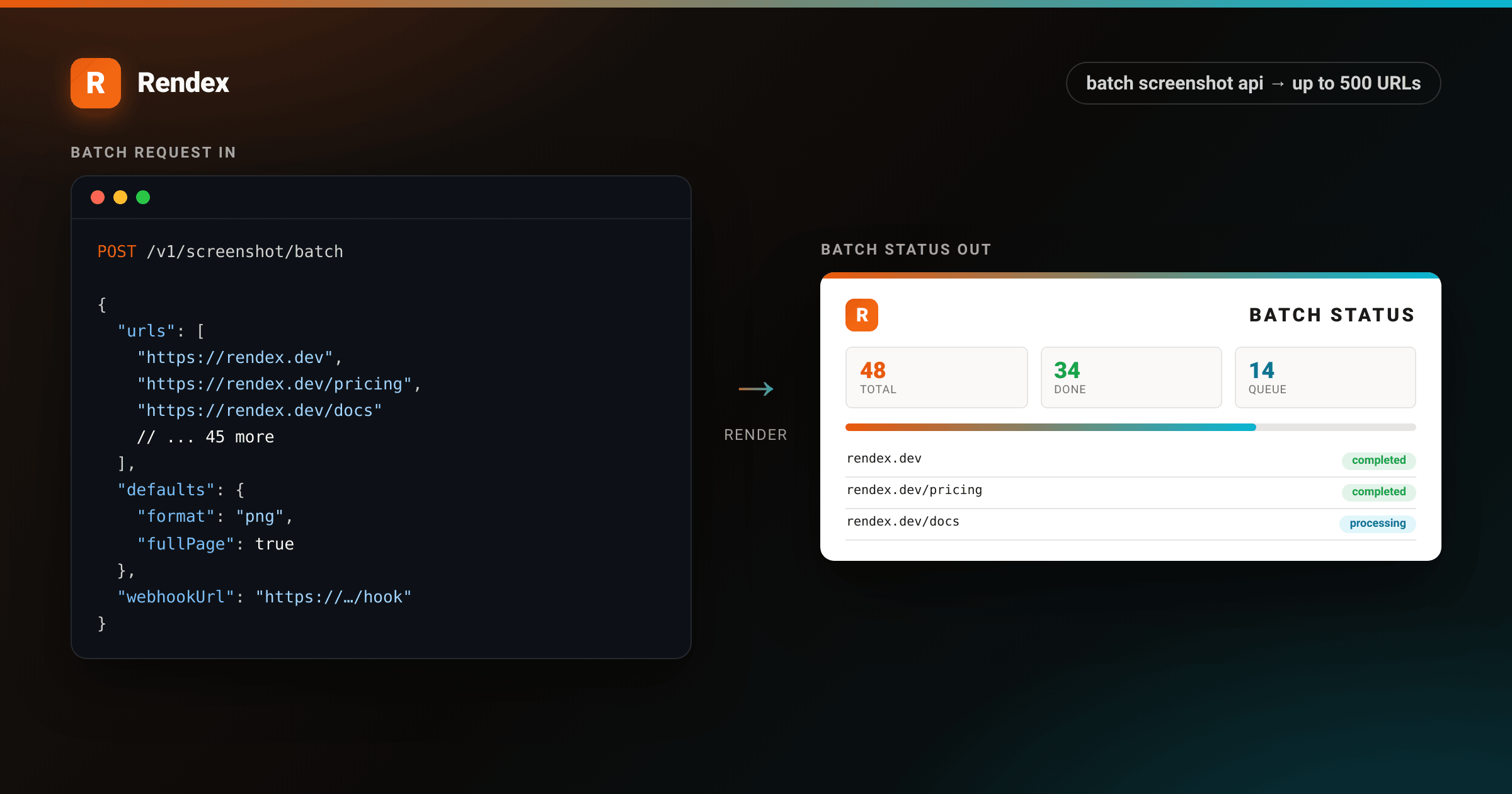
Firing 200 separate screenshot requests one at a time works fine in a script. It falls apart in production: rate limits kick in, error handling gets messy, and you have no way to track overall progress. The batch screenshot API solves this with a single request: submit up to 500 URLs, get a batch ID back, then poll or receive a webhook when all jobs finish.
This guide covers submitting a batch, polling for results, fanning out with a webhook, and knowing when batch beats firing N single requests.
When to Use Batch vs. Single Requests
Single requests are fine for on-demand captures (a user clicks “screenshot”, you capture, you display). Batch is the right choice when:
- You have a fixed list of URLs to capture in one job (site audit, competitor scan, monitoring baseline).
- You want a single webhook callback when all jobs are done rather than N separate callbacks.
- You need a shared progress indicator (34 of 48 complete) without building your own state machine.
Batch is URL-only. If you need to render raw HTML payloads, fire those as async single requests with async: true using the REST API.
Plan Limits
Batch size caps are per request, not per day. You can fire multiple batches.
| Plan | Max URLs per batch |
|---|---|
| Free | 5 |
| Starter | 25 |
| Pro | 100 |
| Enterprise | 500 |
Credits are charged for the whole batch up front at submission time. If the batch fails before any jobs run, the charge is refunded automatically.
Step 1: Submit a Batch
The batch screenshot API accepts a urls array and a shared defaults object for capture settings. Settings indefaults apply to every URL in the batch. Source-type fields (url, html, markdown) are not allowed in defaults and return a 400 if present.
curl -X POST https://api.rendex.dev/v1/screenshot/batch \
  -H "Authorization: Bearer rdx_YOUR_KEY" \
  -H "Content-Type: application/json" \
  -d '{
    "urls": [
      "https://example.com",
      "https://example.com/pricing",
      "https://example.com/about"
    ],
    "defaults": {
      "format": "png",
      "fullPage": true,
      "width": 1280
    }
  }'

# 202 Accepted — response includes batchId and per-job IDs:
# {
#   "batchId": "a3f9c2e1-...",
#   "totalJobs": 3,
#   "jobs": [
#     { "jobId": "job_01jyav...", "url": "https://example.com", "status": "queued" },
#     ...
#   ]
# }
The JS SDK wraps this in rendex.batch():
import Rendex from "@copperline/rendex"

// npm install @copperline/rendex
const rendex = new Rendex("rdx_YOUR_KEY") // get one at /login

const result = await rendex.batch({
  urls: [
    "https://example.com",
    "https://example.com/pricing",
    "https://example.com/about",
  ],
  defaults: {
    format: "png",
    fullPage: true,
    width: 1280,
  },
})

console.log(result.data.batchId)    // "a3f9c2e1-..."
console.log(result.data.totalJobs)  // 3
The Python SDK uses rendex.batch() with snake_case parameter names:
from rendex import Rendex

# pip install rendex
rendex = Rendex("rdx_YOUR_KEY")  # get one at /login

result = rendex.batch(
    urls=[
        "https://example.com",
        "https://example.com/pricing",
        "https://example.com/about",
    ],
    defaults={
        "format": "png",
        "fullPage": True,
        "width": 1280,
    },
)

batch_id = result["data"]["batchId"]
print(f"Submitted {result['data']['totalJobs']} jobs, batch {batch_id}")
Step 2: Poll for Results
The batch runs asynchronously on Cloudflare Queues. Poll GET /v1/batches/:batchId to check progress. Each job in the response includes a resultUrl (signed R2 link, valid for 24 hours by default) once its status is completed.
<!DOCTYPE html>
<html lang="en">
<head>
<meta charset="utf-8">
<style>
:root {
--brand: #ea580c;
--brand-2: #06b6d4;
--ink: #1c1917;
--muted: #78716c;
--line: #e7e5e4;
--tint: #f5f3f0;
--ok: #16a34a;
--ok-bg: rgba(22,163,74,0.10);
--wait-bg: rgba(6,182,212,0.10);
--wait: #0e7490;
}
* { box-sizing: border-box; }
body {
margin: 0;
background:
radial-gradient(1200px 500px at 80% -10%, rgba(234,88,12,0.10), transparent 60%),
var(--tint);
font-family: -apple-system, BlinkMacSystemFont, "Segoe UI", Roboto, Helvetica, Arial, sans-serif;
color: var(--ink);
padding: 64px 56px;
-webkit-font-smoothing: antialiased;
font-variant-numeric: tabular-nums;
}
.page {
max-width: 760px;
margin: 0 auto;
background: #fff;
border-radius: 6px;
box-shadow: 0 24px 60px rgba(28,25,23,0.16), 0 2px 6px rgba(28,25,23,0.06);
overflow: hidden;
}
.bar { height: 8px; background: linear-gradient(90deg, var(--brand) 0%, var(--brand-2) 100%); }
.pad { padding: 40px 48px; }
.header-row {
display: flex; justify-content: space-between; align-items: flex-start;
margin-bottom: 28px;
}
.brand-block { display: flex; align-items: center; gap: 13px; }
.logo {
width: 42px; height: 42px; border-radius: 10px;
background: linear-gradient(135deg, var(--brand), #f97316);
color: #fff; font-weight: 800; font-size: 24px;
display: flex; align-items: center; justify-content: center;
box-shadow: 0 6px 16px rgba(234,88,12,0.30);
}
.brand-block .name { font-size: 18px; font-weight: 700; }
.brand-block .sub { font-size: 12px; color: var(--muted); }
.doc-title { text-align: right; }
.doc-title h1 { margin: 0; font-size: 24px; font-weight: 800; letter-spacing: 2px; }
.doc-title .meta { font-size: 13px; color: var(--muted); margin-top: 4px; line-height: 1.6; }
.doc-title .meta b { color: var(--ink); }
.pill {
display: inline-block; padding: 4px 12px; border-radius: 999px;
font-size: 12px; font-weight: 700; letter-spacing: 0.3px;
}
.pill-ok { background: var(--ok-bg); color: var(--ok); }
.pill-wait { background: var(--wait-bg); color: var(--wait); }
.progress-bar {
background: #e7e5e4; border-radius: 999px; height: 8px; margin: 12px 0 20px;
}
.progress-fill {
height: 8px; border-radius: 999px;
background: linear-gradient(90deg, var(--brand), var(--brand-2));
width: 72%;
}
.progress-label { display: flex; justify-content: space-between; font-size: 12px; color: var(--muted); margin-bottom: 4px; }
table { width: 100%; border-collapse: collapse; margin-top: 8px; }
thead th {
text-align: left; font-size: 11px; letter-spacing: 1px; text-transform: uppercase;
color: var(--muted); padding: 10px 12px; border-bottom: 2px solid var(--line);
}
thead th.r { text-align: right; }
tbody td { padding: 12px; font-size: 14px; border-bottom: 1px solid var(--line); vertical-align: middle; }
tbody td.r { text-align: right; }
tbody tr:nth-child(2n) td { background: #faf9f7; }
.url-cell { font-family: ui-monospace, SFMono-Regular, Menlo, monospace; font-size: 12px; color: #1c1917; }
.job-id { font-family: ui-monospace, SFMono-Regular, Menlo, monospace; font-size: 11px; color: var(--muted); }
.summary-row { display: flex; gap: 24px; margin: 0 0 20px; }
.stat { flex: 1; background: #faf9f7; border-radius: 6px; padding: 14px 16px; border: 1px solid var(--line); }
.stat .v { font-size: 26px; font-weight: 800; }
.stat .l { font-size: 11px; color: var(--muted); letter-spacing: 0.5px; text-transform: uppercase; margin-top: 2px; }
.stat.ok .v { color: var(--ok); }
.stat.wait .v { color: var(--wait); }
.stat.total .v { color: var(--brand); }
.foot { margin-top: 24px; padding-top: 16px; border-top: 1px solid var(--line); display: flex; justify-content: space-between; font-size: 12px; color: var(--muted); }
</style>
</head>
<body>
<div class="page">
<div class="bar"></div>
<div class="pad">
<div class="header-row">
<div class="brand-block">
<div class="logo">R</div>
<div>
<div class="name">Rendex</div>
<div class="sub">Batch Capture Report</div>
</div>
</div>
<div class="doc-title">
<h1>BATCH STATUS</h1>
<div class="meta">
Batch <b>a3f9c2e1</b><br>
Started <b>Jun 25, 2026 · 14:02 UTC</b>
</div>
</div>
</div>
<div class="summary-row">
<div class="stat total"><div class="v">48</div><div class="l">Total jobs</div></div>
<div class="stat ok"><div class="v">34</div><div class="l">Completed</div></div>
<div class="stat wait"><div class="v">14</div><div class="l">Processing</div></div>
</div>
<div class="progress-label">
<span>Progress</span>
<span>34 / 48 · <span class="pill pill-wait">processing</span></span>
</div>
<div class="progress-bar"><div class="progress-fill"></div></div>
<table>
<thead>
<tr>
<th>URL</th>
<th>Job ID</th>
<th class="r">Status</th>
</tr>
</thead>
<tbody>
<tr>
<td class="url-cell">rendex.dev/pricing</td>
<td class="job-id">job_01jyav…</td>
<td class="r"><span class="pill pill-ok">completed</span></td>
</tr>
<tr>
<td class="url-cell">rendex.dev/docs</td>
<td class="job-id">job_01jyaw…</td>
<td class="r"><span class="pill pill-ok">completed</span></td>
</tr>
<tr>
<td class="url-cell">rendex.dev/blog</td>
<td class="job-id">job_01jyax…</td>
<td class="r"><span class="pill pill-wait">processing</span></td>
</tr>
<tr>
<td class="url-cell">rendex.dev/tools</td>
<td class="job-id">job_01jyay…</td>
<td class="r"><span class="pill pill-ok">completed</span></td>
</tr>
<tr>
<td class="url-cell">rendex.dev/compare</td>
<td class="job-id">job_01jyaz…</td>
<td class="r"><span class="pill pill-wait">processing</span></td>
</tr>
</tbody>
</table>
<div class="foot">
<div>batch screenshot api · Rendex Pro plan</div>
<div>resultUrl expires in 24 h</div>
</div>
</div>
</div>
</body>
</html>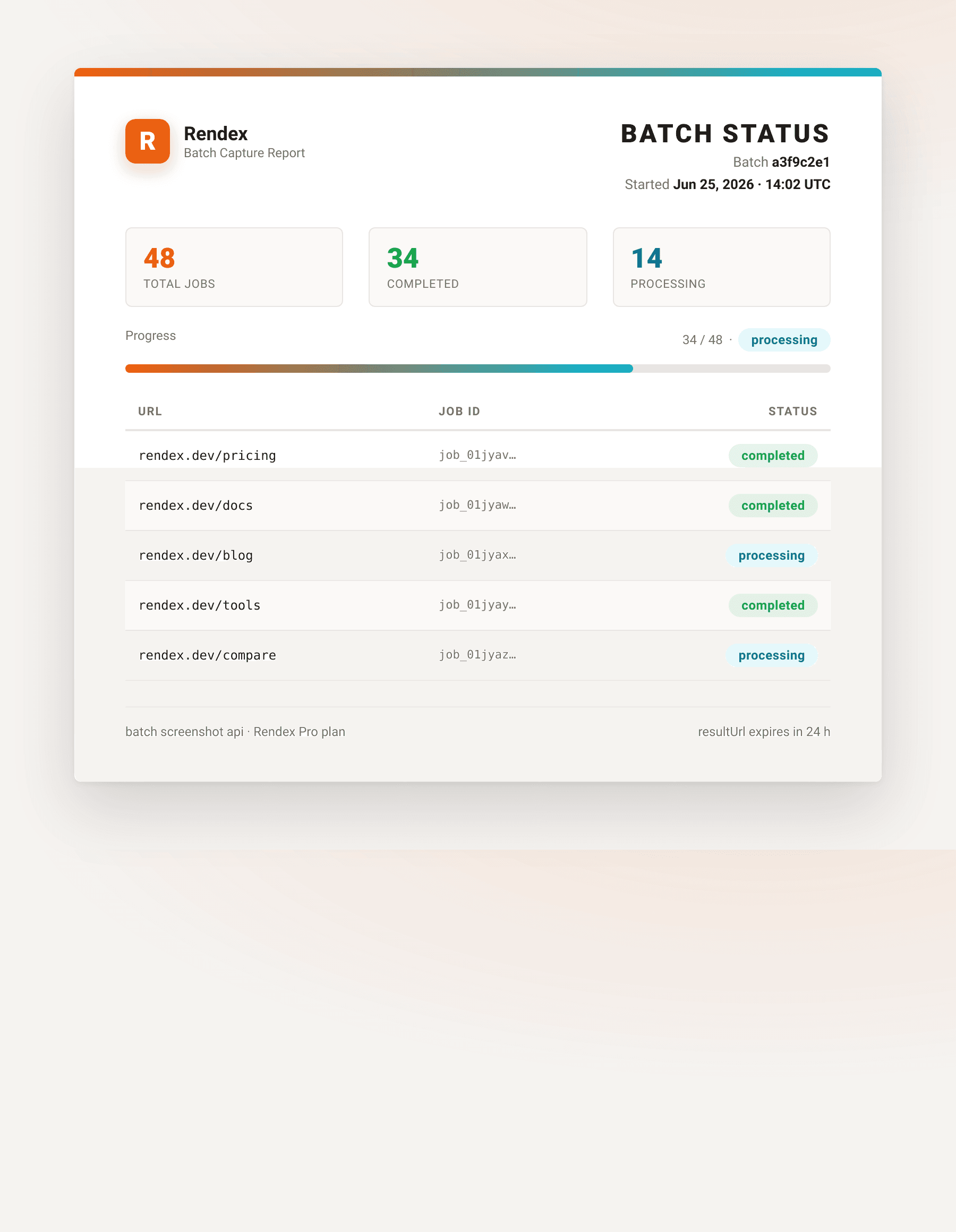
import Rendex from "@copperline/rendex"

const rendex = new Rendex("rdx_YOUR_KEY")

async function waitForBatch(batchId: string, intervalMs = 2000): Promise<void> {
  while (true) {
    const status = await rendex.batchStatus(batchId)
    const { batch } = status.data

    console.log(
      `${batch.completedJobs}/${batch.totalJobs} done` +
      ` (failed: ${batch.failedJobs})`
    )

    if (batch.status === "completed" || batch.status === "partial") {
      for (const job of batch.jobs) {
        if (job.status === "completed" && job.resultUrl) {
          console.log(job.resultUrl) // signed PNG URL
        }
      }
      break
    }

    await new Promise((r) => setTimeout(r, intervalMs))
  }
}

waitForBatch("a3f9c2e1-...")
The batch status field is one of: processing, completed, partial (some jobs failed), or failed.
Step 3: Receive a Webhook When Done
Polling works for scripts. For production services, pass webhookUrl on the batch request. Rendex calls it once when all jobs in the batch have settled, with the same payload shape as the poll response. The request is HMAC-signed so you can verify the source.
curl -X POST https://api.rendex.dev/v1/screenshot/batch \
  -H "Authorization: Bearer rdx_YOUR_KEY" \
  -H "Content-Type: application/json" \
  -d '{
    "urls": ["https://example.com", "https://example.com/pricing"],
    "defaults": { "format": "png", "fullPage": true },
    "webhookUrl": "https://your-app.example.com/hooks/rendex-batch"
}'// Example: Next.js App Router handler
// Rendex sends POST to this endpoint when the batch settles.
import { NextRequest, NextResponse } from "next/server"
import { verifyWebhookSignature } from "@copperline/rendex/webhooks"
export async function POST(req: NextRequest) {
const body = await req.text()
const sig = req.headers.get("rendex-signature") ?? ""
const valid = verifyWebhookSignature({
body,
signature: sig,
secret: process.env.RENDEX_WEBHOOK_SECRET!,
})
if (!valid) return NextResponse.json({ error: "bad signature" }, { status: 401 })
const payload = JSON.parse(body)
const { batchId, status, jobs } = payload.data
const resultUrls = jobs
.filter((j: { status: string }) => j.status === "completed")
.map((j: { resultUrl: string }) => j.resultUrl)
console.log(`Batch ${batchId} settled (${status}): ${resultUrls.length} screenshots ready`)
// store resultUrls, trigger downstream processing, etc.
return NextResponse.json({ received: true })
}Controlling How Long Result URLs Last
By default, signed result URLs expire after 24 hours. Use thecacheTtl field (in seconds) to extend or shorten this. The minimum is 3,600 seconds (1 hour) and the maximum is 2,592,000 seconds (30 days).
{
  "urls": ["https://example.com"],
  "defaults": { "format": "png" },
  "cacheTtl": 604800
}
Troubleshooting
BATCH_LIMIT_EXCEEDED (400): Your batch exceeds the per-plan URL cap. Either split into smaller batches or upgrade. The error response includes the cap for your current plan and the next tier.
Some jobs show status “failed”: Individual jobs can fail without failing the whole batch. Check the error field on each job entry. Common causes: the URL returned a non-200 status, the page timed out, or a wait selector was not found.
Webhook not received: Rendex validates the webhook URL against a block list (private IPs, loopback). The URL must be publicly reachable. For local development, use a tunnel like cloudflared tunnel or ngrok and poll instead.
PLAN_UPGRADE_REQUIRED on a batch with geo: The geo parameter in defaults requires a Pro or Enterprise plan. Free and Starter batches cannot use geo-targeting.
Next Steps
Batch capture works well alongside scheduled monitoring. The website monitoring with automated screenshots guide shows a Cloudflare Workers cron that fires a batch of key pages hourly and alerts on visual changes.
For the full request schema and all defaults options, see the API reference.
Ready to run your first batch? The free screenshot tool lets you try a single capture without code. Get an API key (100 free calls/month, no credit card) to start submitting batches.